

Running dropshipping on WordPress sounds fun till you hit the apps, plugins, and settings wall.
If you’ve got WooCommerce on one side and AliDrop on the other, and you’re not sure how to make them work together, this walkthrough is for you.
We’ll keep it simple, straight, and a bit chatty. By the end, you’ll know what WooCommerce actually does, what AliDrop brings to the table, and how to connect both without breaking your store or your brain.
What is WooCommerce?
WooCommerce is a free e‑commerce plugin that turns a regular WordPress site into an online store where you can sell physical or digital products. It runs on top of WordPress, so you manage products, orders, customers, and payments from the same dashboard you already use for posts and pages.
Because WooCommerce is open source, you keep full control of your store data, your checkout flow, and which hosting and extensions you use. There’s a big library of themes and add‑ons, plus a huge developer community, so you can adjust things later instead of being stuck with a fixed hosted system. You can read more or grab it directly from the official WooCommerce site.
What is AliDrop?
AliDrop is a dropshipping app that connects your store to products from AliExpress, Alibaba, Temu, and trusted US and EU suppliers, then automates importing products and fulfilling orders. Instead of manually copying titles, images, and prices, you pull products in with a click and let the app handle syncing and sending orders to suppliers.
It started as an AliExpress product importer but has grown into a bigger automation tool with things like US/EU supplier support, profit analytics, and AI helpers for store setup and content. AliDrop integrates with Shopify and also offers a WooCommerce plugin, so you can use it on a WordPress store instead of switching platforms if you don’t want to leave WooCommerce.
If you want to browse pre‑picked products from AliDrop’s own catalog, you can check the AliDrop marketplace for “already working” items before you start pulling things into your store.
Benefits of Using AliDrop with WooCommerce
Putting WooCommerce and AliDrop together gives you WordPress flexibility plus automation for dropshipping tasks.
Here’s why the combo makes sense if you’re serious about dropshipping:
- You can connect to millions of AliExpress products and bring them into your store without copy‑pasting data. The dedicated AliExpress dropshipping page explains how that side works.
- You’re not limited to AliExpress; AliDrop also taps into Alibaba suppliers for bulk‑friendly and branding‑friendly sourcing.
- If you sell to the US or EU, you can pull from vetted US and EU suppliers to cut shipping times and reduce refund headaches.
- AliDrop supports Temu as another sourcing option, and you can explore that angle on their Temu suppliers page.
- The app can auto‑sync inventory and push orders to suppliers, so you spend less time updating stock levels or chasing tracking numbers.
- You keep the design freedom of WooCommerce, choosing your own theme, checkout, and plugin stack while still using AliDrop’s sourcing and automation.
- If you ever run multiple channels (for example, Shopify plus WooCommerce), AliDrop already has an AI Shopify store builder and works across different setups, which is handy if you expand later.
- Pricing is straightforward and includes a free trial; you can see the tiers on AliDrop’s pricing plans page and pick one that fits your volume instead of overpaying from day one.
How to Set Up WooCommerce and AliDrop Together: WordPress Users
Let’s walk through the setup so you can actually use both tools together instead of just reading about them.
We’ll assume you already have basic WordPress hosting and a domain. If not, sort that first, then come back here.
1. Prepare your WordPress site
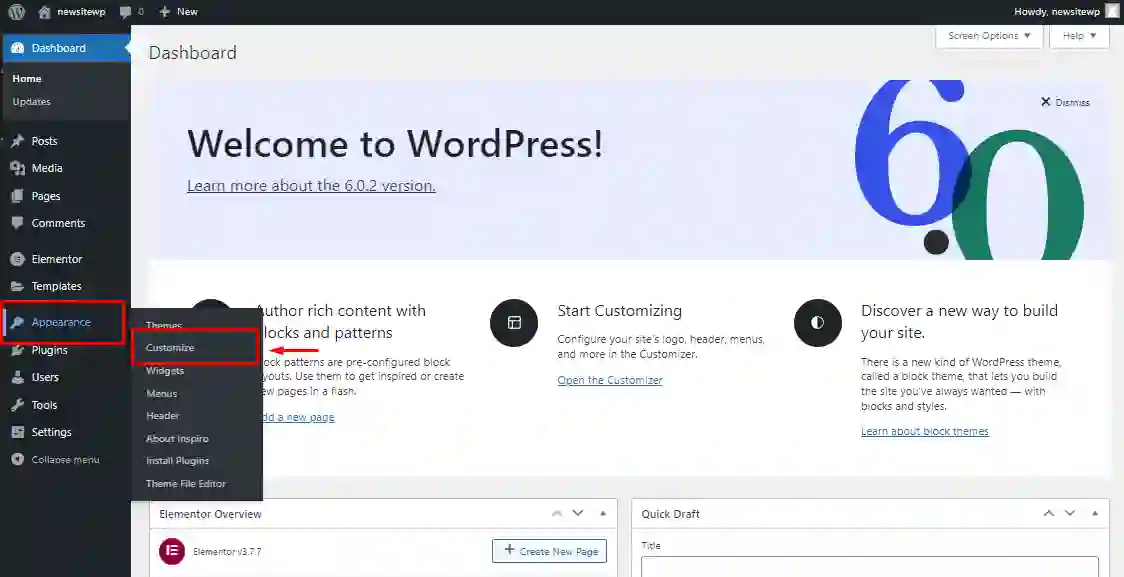
Before touching WooCommerce or AliDrop, make sure your WordPress install is clean and updated.
- Update WordPress to the latest version from Dashboard → Updates.
- Pick a theme that plays well with WooCommerce (lots of themes label themselves clearly for that).
- Turn on pretty permalinks under Settings → Permalinks so product URLs don’t look messy.
You don’t need a perfect design now. Just avoid a broken or half‑configured base, because that stuff can cause weird checkout bugs later.
2. Install and activate WooCommerce
Next, you turn the site into a store.
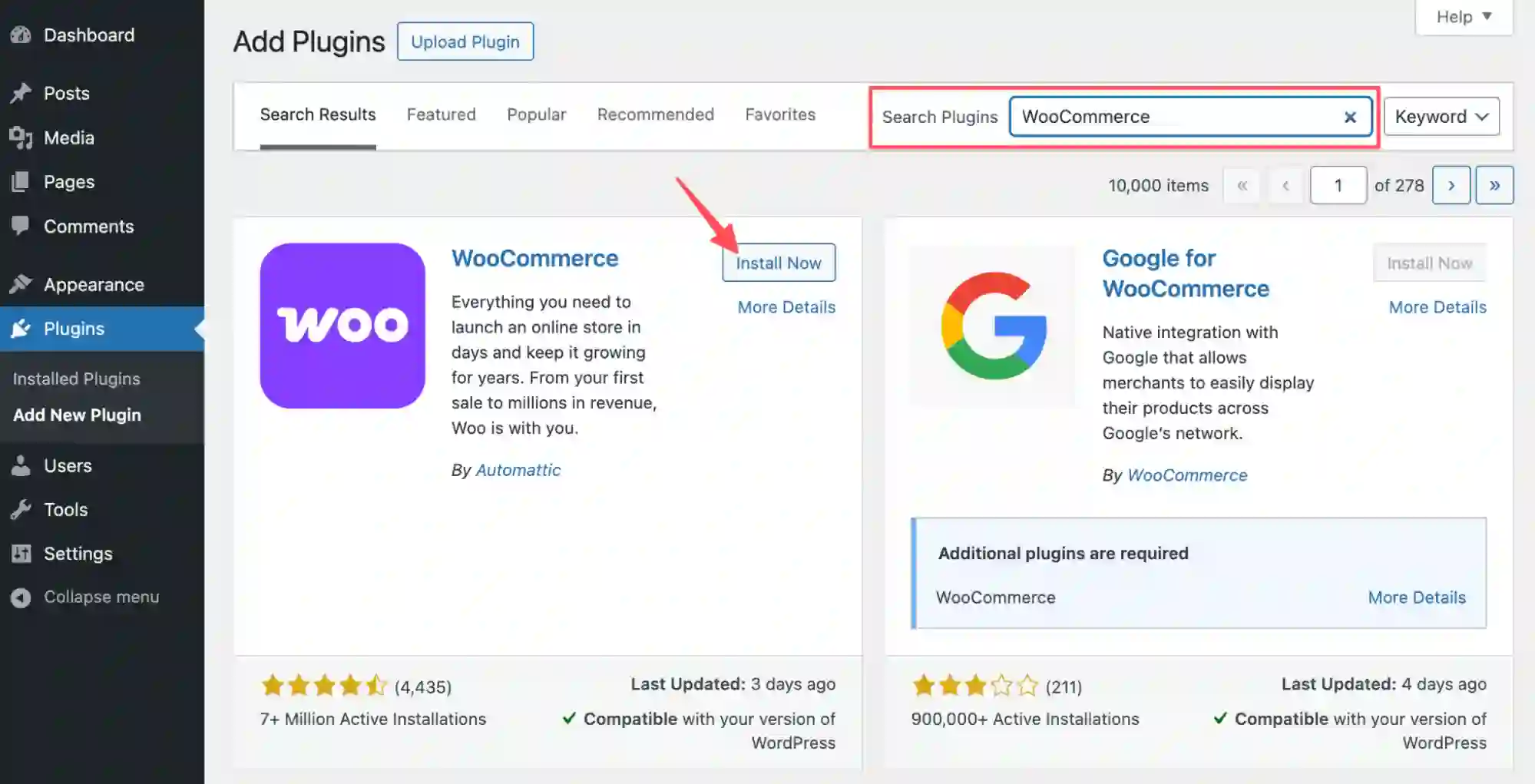
- In your WordPress dashboard, go to Plugins → Add New.
- Search for “WooCommerce”.
- Install and activate the official WooCommerce plugin from Automattic.
Once activated, WooCommerce walks you through a basic setup wizard where you choose:
- Store country, currency, and selling regions.
- Product types (physical, digital, or both).
- Basic shipping and tax behavior.
You can always change this later in WooCommerce → Settings, so don’t get stuck trying to make everything perfect on the first pass.
If you want to read a bit more about what WooCommerce can handle long term, you can skim their WordPress ecommerce plugin overview while you’re here.
3. Set up checkout, payments, and accounts
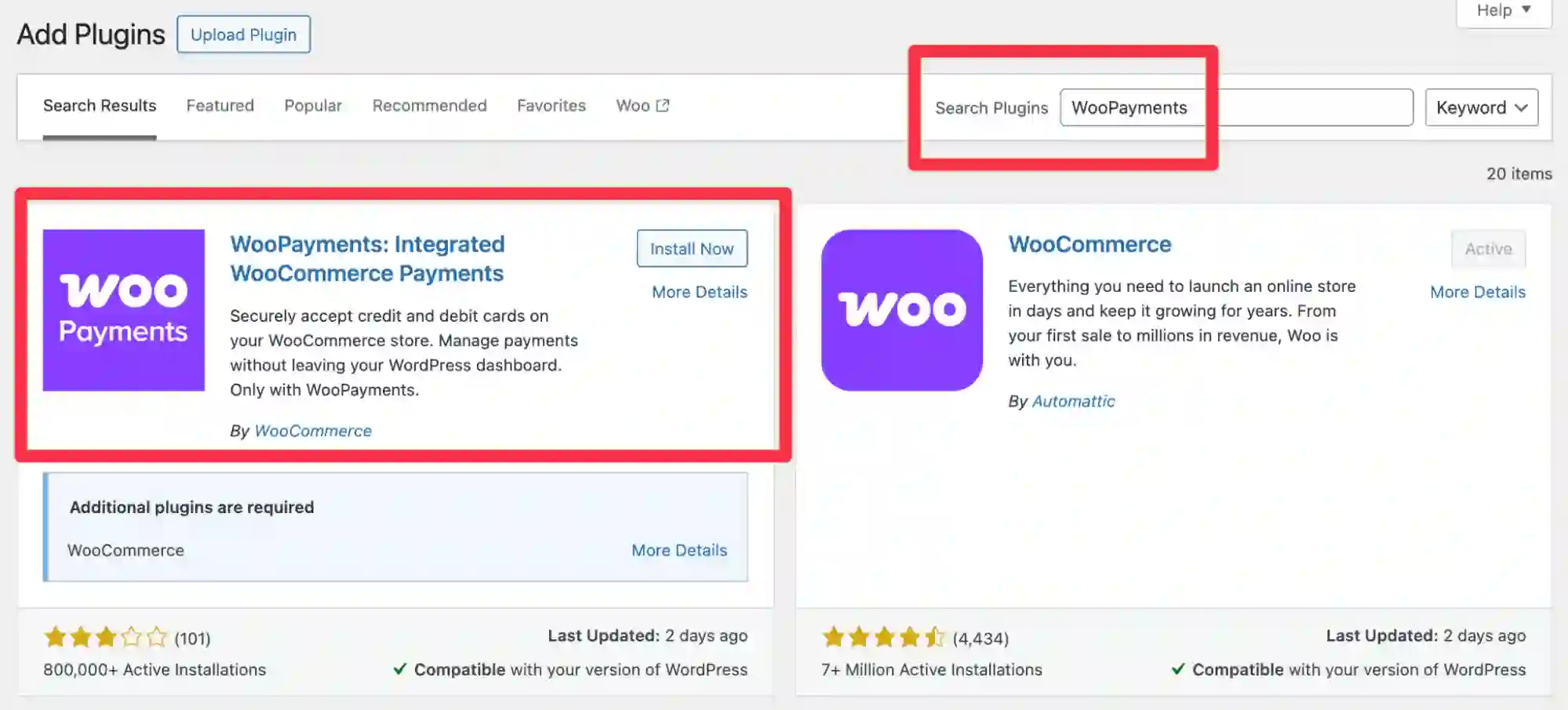
Your store needs a way to accept money and let customers log in.
- Under WooCommerce → Settings → Payments, enable at least one payment method your main country actually uses (Stripe, PayPal, local gateways, etc.).
- Under WooCommerce → Settings → Accounts & Privacy, allow customers to create an account during checkout or place orders as guests, depending on how strict you want to be.
If you want a proper account page, make sure WooCommerce created a “My Account” page and that it’s linked under WooCommerce → Settings → Advanced → Page setup. From a shopper’s point of view, that page works like the official WooCommerce login area, but inside your own site.
Test a dummy checkout with a low‑priced test product and a sandbox payment method if your gateway supports it.
4. Create a clean product structure in WooCommerce
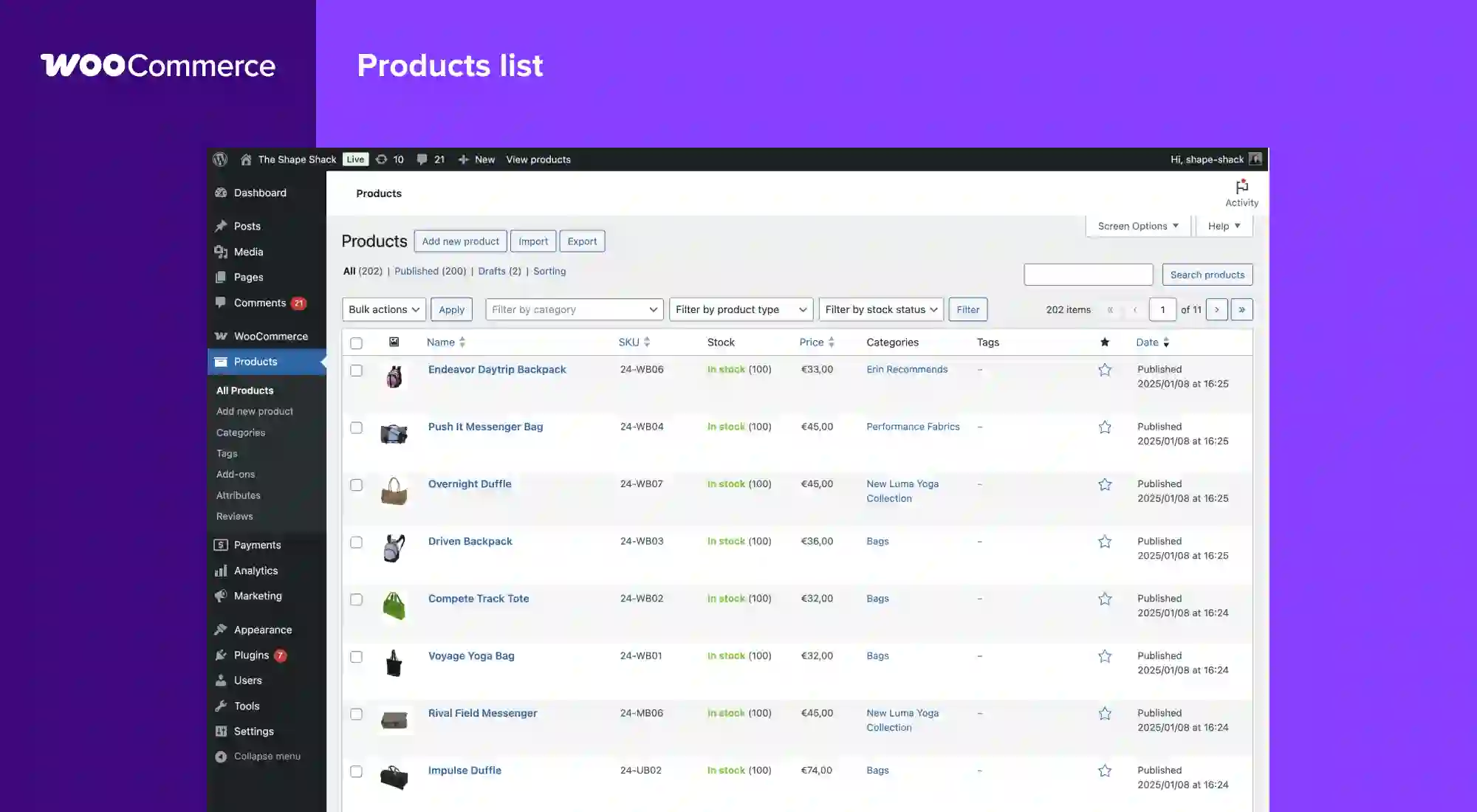
Before connecting AliDrop, set up your basic product structure:
- Make key categories (for example, Women’s Shoes, Home Office, Pet Accessories).
- Add at least one simple placeholder product per category so you can see how the layout feels.
- Check how product pages look on desktop and mobile; adjust your theme settings if something looks off.
AliDrop will later plug products into these categories or new ones you create, but it’s easier to manage if your store isn’t a total mess.
5. Set up your AliDrop account

Now jump over to AliDrop.
- Go to the main AliDrop site and start their account signup and free trial flow.
- During onboarding, you’ll answer questions about niche, target market, and your e‑commerce platform.
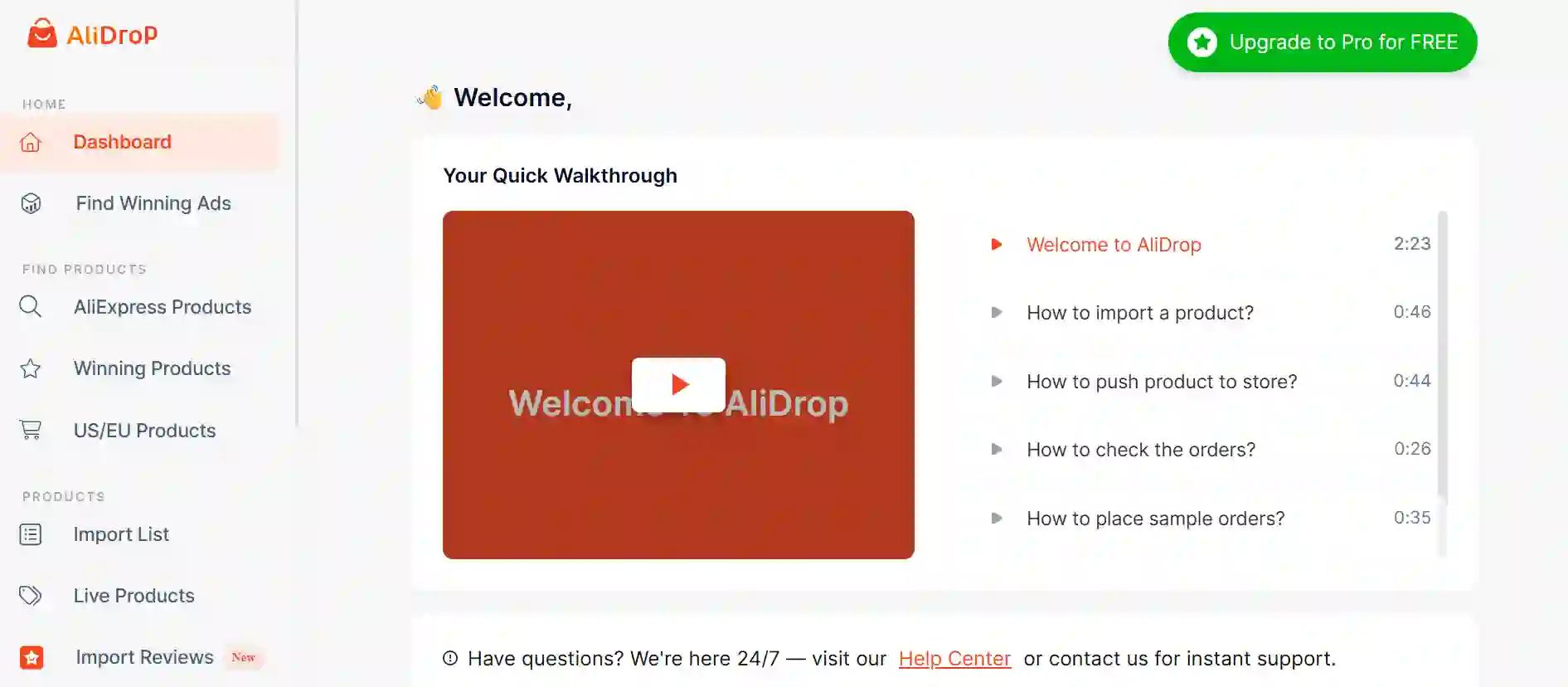
- Once inside the dashboard, you’ll see panels for AliExpress products, winning products, US/EU products, live products, orders, and settings.
AliDrop offers a free trial window (7 days, at the time of writing) and paid plans after that, so you can test the workflow and see how automation fits your store.
6. Connect AliDrop to WooCommerce
AliDrop supports WooCommerce through a plugin that connects your WordPress store and your AliDrop account.
The typical flow looks like this:
- From the AliDrop dashboard, go to the integrations or store‑connections area and choose WooCommerce as your store type.
- AliDrop will either give you a dedicated plugin download link or guide you to the WordPress plugin you need.
- Install that plugin on your WordPress site (Plugins → Add New → Upload Plugin if it’s a zip).
- After activation, you’ll usually see a settings page asking for an API key or token from your AliDrop account. Paste that in and save.
Once connected, AliDrop and WooCommerce can talk to each other: products can be pushed in, and orders can sync back for fulfillment.
7. Use AliDrop to find products worth selling
Now the fun part: picking what you actually want to sell.
Inside AliDrop, you’ll see tabs like:
- AliExpress products – curated AliExpress items with clear profit margins and supplier info.
- Winning products – items already performing well across other stores, often with decent order volume and reviews.
- US/EU products – products from suppliers closer to your main customer regions, usually with faster shipping.
Use filters for category, price, shipping location, and ratings. You don’t need to import hundreds of items at once; start with a small set and test demand before scaling.
8. Import products into WooCommerce from AliDrop
When you spot something that fits your niche, you add it to your store.
Here’s the basic flow AliDrop uses:
- Click “Add to import list” (or similar wording) on a product in the AliDrop dashboard.
- Open your import list and tweak the product title, description, tags, and images.
- Choose the target collection or category that matches your WooCommerce categories.
- Push the product to your store.
For each product, pay attention to:
- Titles: shorten them and strip weird AliExpress keyword stuffing so they look clean.
- Images: remove low‑quality or duplicate images.
- Variants: disable variants you don’t actually want to sell (odd colors, sizes that rarely sell, etc.).
If you need help writing product text for another store or channel, AliDrop also has an AI product description writer, but even then, read what it gives you and adjust to your own tone.
9. Set pricing and profit margins
AliDrop surfaces the supplier cost and lets you see the gap between cost and your sale price so you can decide whether a product is worth it.
When you’re setting prices:
- Factor in payment fees, refunds, and ad costs, not just the raw product price.
- Leave some room for discounts and bundles later so you don’t trap yourself with razor‑thin margins.
- Keep prices in a round‑ish format that doesn’t look random to human buyers.
You can set simple rules inside AliDrop (for example, markup ranges) and then fine‑tune outliers directly in WooCommerce if needed.
10. Configure shipping and handling expectations
Shipping is where dropshipping stores often lose customers.
With AliDrop, you can:
- Prefer US/EU products for your main market so shipping times are shorter.
- Check shipping methods and estimated delivery dates per product before importing.
- Mix AliExpress, Alibaba, and Temu suppliers, but stay consistent enough that customers don’t get wildly different delivery experiences on the same site.
Set up your shipping zones and methods in WooCommerce so they roughly match what your suppliers can provide, and update your product pages or FAQs with realistic delivery time ranges.
11. Automate order fulfillment with AliDrop
Once you have traffic and orders, you don’t want to click through AliExpress manually every single time.
AliDrop supports automated order handling:
- Orders from your store show up in AliDrop’s orders section.
- You can send them to the right supplier in a couple of clicks instead of re‑typing customer data.
- Tracking details sync back, so customers can see status updates without you emailing everyone manually.
Before going fully live, place a test order on your WooCommerce store, then watch it flow into AliDrop and through to the supplier to confirm nothing breaks.
12. Keep an eye on performance and costs
After the first batch of orders, you’ll start seeing patterns:
- Some products move fast with decent margins.
- Some get traffic but no conversions.
- Some get returns or complaints about quality or shipping.
AliDrop’s analytics and pricing views help you see which products are worth keeping and which suppliers cause trouble. If something sells well from AliExpress but shipping is slow, check if similar items exist through their US/EU or Temu or Alibaba sourcing options and switch suppliers when it makes sense.
You can always revisit plan details as your store grows; if volume climbs, moving from a starter‑type plan to a higher tier on the AliDrop pricing page might save time and manual effort compared to sticking with the lowest option.
Mistakes to Avoid During the AliDrop and WooCommerce Setup
You can do a lot right and still kill your conversion rate with a few avoidable mistakes.
Here are some things to watch out for:
- Importing random products with no clear niche
If your store sells everything from dog toys to laser levels, your ads and branding get fuzzy and people bounce. Pick a clear angle and stick to it at the start. - Ignoring shipping times and locations
Pulling only China‑based suppliers for US customers and promising fast delivery is a recipe for angry emails. Use AliDrop’s US/EU and regional sourcing options when your main audience is in those regions. - Leaving product titles and descriptions in “AliExpress default” mode
Those long, spammy titles full of commas and repeated keywords turn people off. Shorten them and speak like a real person. - Not checking product reviews and ratings before importing
Importing items with bad ratings just because the margin looks good usually backfires with refunds and disputes. - Overcomplicating the checkout flow
Forcing account creation, adding too many fields, or stacking too many payment plugins can hurt conversion. Keep the checkout simple and test it on both mobile and desktop. - Skipping test orders
Never launch ads before running at least one real test order from browse to delivery. You want to see how long shipping actually takes and whether suppliers pack items properly. - Ignoring pricing structure
If you mark prices up randomly without thinking about fees, exchange rates, and shipping, you can end up breaking even or losing money per order even while revenue looks okay. - Forgetting store basics while chasing tools
Apps and plugins help, but basic stuff like clear policies, honest delivery times, and decent images often matter more than one extra automation feature.
Conclusion
AliDrop and WooCommerce together give you a practical way to run a dropshipping store on WordPress without rebuilding everything on a different platform. WooCommerce handles the storefront, checkout, and WordPress side, while AliDrop takes care of sourcing, imports, and most of the boring repetitive work with suppliers.
You still have to do the thinking: picking a niche, choosing good products, setting real expectations, and fixing problems as they show up. The stack doesn’t magically fix bad offers or weak copy, but it does make it much easier to test products at scale and keep your catalog moving.
If you’re at the stage where you just want to try this in real life instead of reading about it, you can start a free trial on AliDrop and connect it to your WooCommerce store once your WordPress basics are in place.
AliDrop WooCommerce Setup for WordPress Users 2026 FAQs
Do I need coding skills to use WooCommerce with AliDrop?
No. You should be comfortable clicking around WordPress, installing plugins, and changing settings, but you don’t need to write code for a basic AliDrop + WooCommerce setup. If you ever want heavy custom design or custom checkout flows, a developer can help, but it’s not required at the start.
Can I use AliDrop if I already run a Shopify store?
Yes. AliDrop runs as an app for Shopify and also integrates with WooCommerce, which means you can use it across different stores if you want. Some sellers keep a Shopify store for one brand and a separate WordPress store for content‑heavy projects.
How does AliDrop handle returns and refunds?
AliDrop itself is the bridge between your store and suppliers; actual returns and refunds depend on the policies of AliExpress, Alibaba, Temu, and the specific suppliers you choose. In your store, you should write clear refund and return rules that match what your suppliers will realistically honor.
Is WooCommerce free to use?
Yes, the core WooCommerce plugin is free and open source, and you can download it or install it straight from the WordPress plugin area. You’ll still pay for hosting, any paid extensions, payment‑gateway fees, and whatever paid theme or plugins you decide to use.
Is AliDrop only for AliExpress products?
No. It works with AliExpress but also supports Temu and Alibaba sourcing, plus directories of US/EU suppliers so you’re not locked into just one marketplace. That mix lets you switch suppliers for the same type of product if you want faster shipping or better quality.
How many products should I start with?
It’s usually better to start with a small, focused catalog—maybe 10–30 products in one clear niche—rather than dumping hundreds of random listings into your WooCommerce store. Once you see what sells and what doesn’t, you can add more from your AliDrop dashboard without rebuilding everything.


%201.svg)