


You just launched your dropshipping store. The products are listed, the theme looks clean, and you are ready for sales. But something is missing. Customers land on your product pages, see zero reviews, and leave. They have no way of knowing if your products are quality or if you are a trustworthy seller. This hesitation kills conversions.
The solution is right in front of you. Your suppliers on AliExpress already have hundreds or thousands of genuine customer reviews. You just need to bring those reviews to your store. When you bulk import AliExpress reviews, you instantly give your products the social proof they need to convert visitors into buyers.
This guide walks you through everything. You will learn why reviews matter, how to scrape review data legally, the best apps with their exact pricing, and step-by-step workflows that save you hours. Whether you use Shopify, WooCommerce, or BigCommerce, you will find exactly what you need to start importing today.
Why Import AliExpress Reviews to Your Store?
Adding reviews to your store is not just about filling empty space. It directly impacts your bottom line in several measurable ways. When you import AliExpress reviews, you are essentially borrowing the trust that other sellers have already built.
Build Instant Trust and Credibility
Customers are naturally skeptical of new stores. They have been burned by dropshippers with long shipping times and poor quality products. Positive reviews act as social proof, signaling that real people have purchased and approved of the product. By importing existing reviews from AliExpress, you can showcase feedback from customers who have already bought and used the item, building trust much faster than collecting reviews from scratch.
When potential buyers see dozens of reviews with photos and detailed feedback, they feel more confident. They know what to expect regarding sizing, quality, and functionality. This confidence translates directly into higher conversion rates. You can also find reliable best US and EU suppliers through Alidrop to complement your AliExpress sourcing.
Improve Your SEO Rankings
Search engines love fresh, relevant content. User-generated content like reviews provides exactly that. Each review adds unique text to your product pages, which search engines index and consider when ranking your site. When you bulk import AliExpress reviews, you are adding hundreds of keyword-rich paragraphs without writing a single word yourself.
Reviews also help with long-tail search queries. Someone searching for "does this wireless charger work with iPhone 15" might find your product page because a review mentions exactly that. You capture traffic you would otherwise miss. This AI product description writer can help you optimize your product pages further.
Increase Conversion Rates
Products with reviews simply sell better. Research shows that 93 percent of consumers say online reviews influence their purchase decisions. When customers see positive feedback, it removes the perceived risk of buying from an unknown store. They stop wondering and start adding to cart.
The impact is significant. Stores that display reviews consistently report higher conversion rates than those that do not. By importing reviews upfront, you skip the painful period of waiting for your first few sales to generate feedback. You start with credibility from day one.
Enhance the Customer Experience
Reviews often include photos uploaded by real customers. These images show the product in everyday settings, giving future buyers a realistic view of what they will receive. This user-generated content creates a more engaging and interactive shopping environment.
When shoppers can see multiple angles, different lighting conditions, and honest opinions, they make more informed decisions. This leads to fewer returns and higher satisfaction. For stores looking to expand beyond AliExpress, exploring Alibaba suppliers can provide additional product sourcing options.
How to Get Started Scraping AliExpress Reviews Online
Before you start importing, you need to understand the technical process and legal landscape. Here is how to approach scraping reviews the right way.
The basic workflow involves three steps. First, you install a review importer app on your ecommerce platform. Second, you provide the app with links to your products on AliExpress. Third, the app pulls the reviews and displays them on your store. Most apps handle the scraping automatically, so you do not need technical skills.
Here are the key considerations before you start:
- Understand AliExpress terms of service. AliExpress generally prohibits the systematic retrieval of site content to create a collection or database without written permission. However, most review importer apps operate in a way that complies with these terms by accessing publicly available data at a reasonable rate. You should always use official apps rather than custom scraping scripts that could get your IP banned.
- Focus on relevance. When importing reviews, you want feedback that matches your specific product. A similar but not identical item may have reviews mentioning features your version lacks. This can mislead customers and lead to returns. Always verify that the AliExpress product you are pulling from matches yours in terms of specifications, sizing, and materials. Tools that help you import products from AliExpress to Shopify often include review matching features.
- Respect intellectual property. You are importing reviews, not images or product descriptions that may be copyrighted. Reviews are generally considered user-generated content, but you should still credit the source appropriately. Most apps do this automatically by including "Verified Review" badges. The AliExpress dropshipping plugin ecosystem has evolved to handle these nuances.
- Use multiple sources when possible. Some apps allow you to import from Amazon, Etsy, and other platforms as well. Diversifying your review sources makes your store look more established and less dependent on any single supplier. For WooCommerce advanced AliExpress product importer users, this multi-source capability is particularly valuable.
- Consider CSV backup. Knowing how to scrape AliExpress data to CSV in 2026 can be useful for creating backups or migrating between platforms. Many apps offer export functionality that saves your imported reviews as CSV files.
Common Technical Hurdles and How to Overcome Them
Even with the best apps, you may encounter technical issues when you bulk import AliExpress reviews. Here are the most common problems and their solutions.
Image Import Failures
If you are based in India, you might not see images attached to reviews imported from AliExpress. This happens because AliExpress is blocked on Indian servers, so those images won't load locally. However, they remain visible to users in other regions. The solution is to use a VPN during the import process or accept that images may not display for local store management.
Invalid Shop Domain Errors
When installing review importer apps, you may encounter an "Invalid shop domain" error if you enter your custom domain instead of your Shopify store domain. Always use your Shopify store domain (for example, mystore.myshopify.com) rather than your custom domain (for example, www.mystore.com) during installation.
No Reviews Found
If the import process returns zero reviews, adjust your settings. Check that the AliExpress product URL actually has reviews available. Try changing the number of reviews to import or disabling country filters. Sometimes products have reviews but not from the countries you selected.
Duplicate Reviews
When you run multiple imports for the same product, you may end up with duplicate reviews. Most apps have duplicate filtering built in, but you should check your settings. Enable duplicate detection to prevent cluttered review sections.
Best Apps for Importing AliExpress Reviews to Your Store
The app you choose determines how easy the process is and how good the final result looks. Here are the top options for 2026, each with their unique strengths.
1. Ali Reviews

Ali Reviews (formerly Kudosi Reviews) is an AI-powered review importer app designed to help Shopify store owners effortlessly import authentic reviews from AliExpress and Amazon. This tool not only saves time but also builds instant trust with potential customers by showcasing real product feedback. Kudosi simplifies the review collection process by suggesting qualified sources for importing photos and videos directly to your store .
- AI-powered import that suggests the best sources for importing reviews, including photos and videos.
- Automated email requests to collect authentic product reviews through post-purchase emails.
- Stunning review display with a customizable, fast-loading review widget that matches your brand's aesthetic.
- Boost search rankings by displaying ratings and reviews on Google Shopping ads.
- Exclusive AI suggestions ensure you receive high-quality, relevant feedback for your products.
- Versatile display options let you showcase photos and video reviews anywhere on your site.
Pricing: Free plan available; Super plan at $12.99 per month.
2. Dadao Product Reviews&Referral

Dadao Product Reviews&Referral allows Shopify store owners to effortlessly collect and display customer reviews from multiple platforms, including Amazon, AliExpress, Etsy, Walmart, and more, or through CSV imports. Recognizing that trust is fundamental to business success, the app integrates with six major shopping platforms, enabling users to import a wealth of reviews with just a single link.
- Comprehensive review scraping by URL or CSV import from multiple ecommerce platforms.
- AI review analytics to identify product issues and enhance overall customer satisfaction.
- Multi-platform integration for importing reviews from Amazon, AliExpress, Etsy, Walmart, and Mercado.
- Versatile display options including Grid, List, Carousel, Popup, and Sidebar widgets.
- Automated post-purchase emails that send review requests along with coupons to encourage referrals.
- Google Shopping and Search integration to display reviews in search results and ads.
Pricing: Free.
3. TrustReviews: Product Reviews

TrustReviews is a powerful app designed to help Shopify store owners effortlessly collect and display product reviews on their websites. By allowing customers to make well-informed buying choices, TrustReviews enhances user trust and boosts sales. With a suite of customizable features, including automatic email reminders and advanced analytics, this app simplifies the review management process.
- One-click import of existing reviews from Amazon and AliExpress, enriching your product pages instantly.
- Customizable widgets in list view, grid view, or carousel view to match your store's design.
- Automatic email reminders to incentivize customers to leave reviews after their purchase.
- Advanced analytics providing insights into customer behavior and review performance.
- Moderation and response options to manage customer feedback effectively.
- Multiple pricing tiers to accommodate stores of different sizes and needs.
Pricing: Free plan available; Basic at $9.99 per month; Premium at $24.99 per month; Unlimited at $99.99 per month.
4. Judge.me AliExpress Reviews
Judge.me AliExpress Reviews is a powerful tool designed for store owners who want to effortlessly import unlimited reviews from AliExpress. With the ability to display these reviews using popular review apps, this app enhances your store's credibility and boosts customer trust. Users can easily install the app or the Chrome extension, select their desired product, and input the corresponding AliExpress product URL to begin the import process.
- Unlimited review imports from AliExpress without any caps on quantity.
- Run multiple imports simultaneously to gather reviews faster and more effectively.
- Advanced filtering options to select the number of reviews to import or filter for reviews with photos.
- Chrome extension support for importing reviews directly from AliExpress pages.
- Seamless integration with Judge.me or export to other review apps.
- Weekly automatic review sync keeps your reviews updated with new feedback.
Pricing: Free.
5. Areviews ‑ Reviews Importer
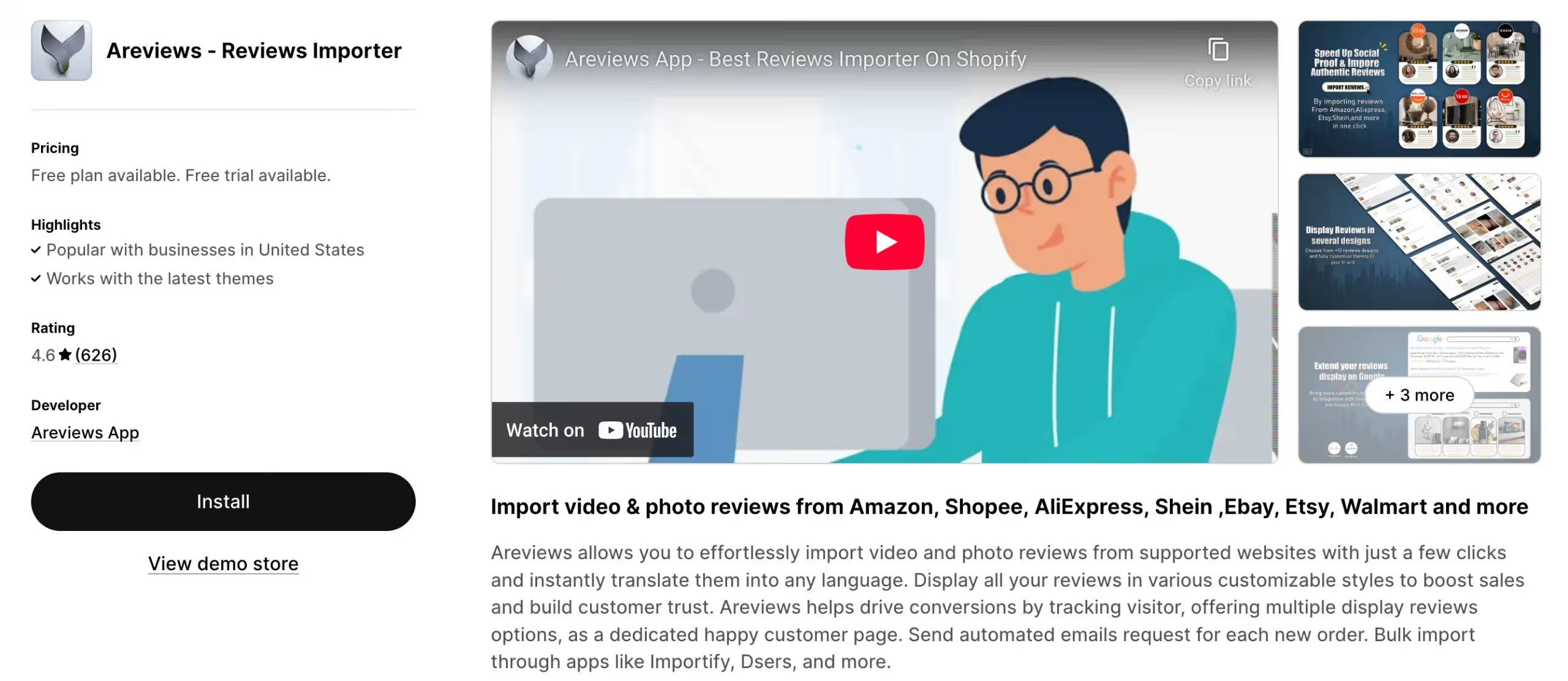
Areviews is a comprehensive review importer app that allows Shopify store owners to easily import video and photo reviews from popular platforms such as Amazon, Shopee, AliExpress, Shein, eBay, Walmart, and more. With just a few clicks, you can gather authentic customer reviews and display them in various engaging styles.
- Auto-sync new reviews to keep your product pages fresh and engaging without manual updates.
- Import from multiple platforms including Amazon, AliExpress, and CSV file uploads.
- Versatile display options such as sliders, popups, badges, and carousels.
- Messaging system for new orders to send messages and coupons, fostering engagement and loyalty.
- Integration with many applications and services including Google Shopping and Google Snippets.
- Collect customer feedback through automated email requests for photo reviews.
Pricing: Free plan available; Premium at $6.99 per month; Ultimate at $12.99 per month.
6. Ryviu
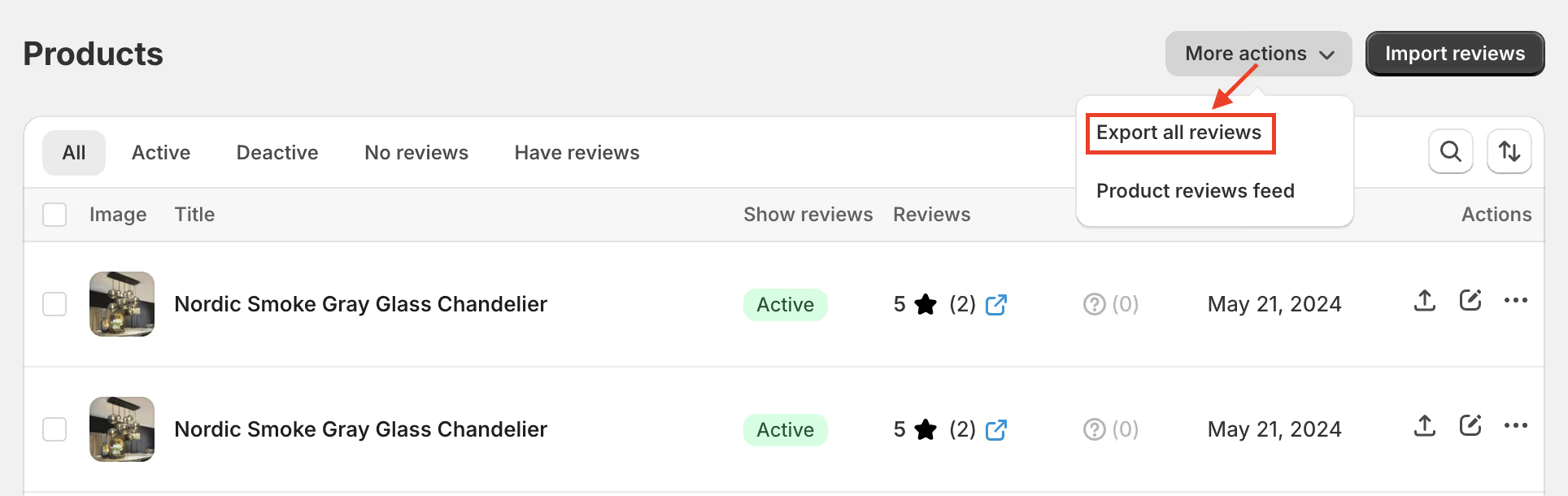
Ryviu offers a robust import system that pulls reviews from AliExpress, Amazon, Etsy, DHgate, and Walmart.com. This breadth of sources means you are not limited to AliExpress if you find better products elsewhere. The import process is straightforward, and the free plan supports AliExpress imports, making it accessible for beginners.
- Multi-platform import from AliExpress, Amazon, Etsy, DHgate, and Walmart.
- Chrome extension required for importing, ensuring a streamlined workflow.
- Support for products with multiple variations, handling complex product structures well.
- 7-day trial period to explore premium features before committing.
- Export functionality to move reviews between platforms as needed.
- Dedicated support team available through live chat and email.
Pricing: Free plan with 20 reviews per product and 50 product limit; paid plans start at $9.99 per month.
7. Editorify
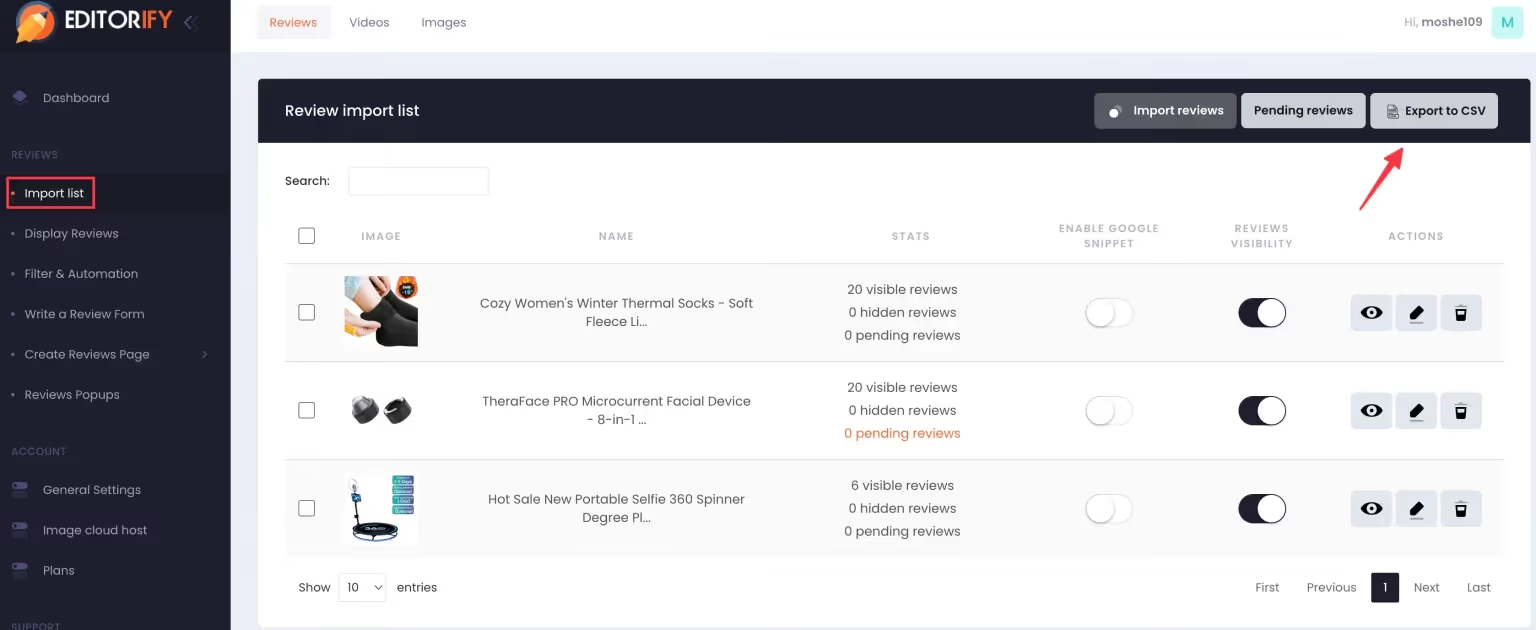
Editorify makes it easy to import authentic WooCommerce reviews from multiple wholesalers into your store to boost customer trust, maximize engagement, build social proof, and get more sales. It helps you easily import reviews from AliExpress, Alibaba, Etsy, Dhgate, and many other sources.
- Import product rating reviews from AliExpress, Alibaba, Etsy, Dhgate, Taobao, 1688, Wish, and more.
- Rate filter to choose which reviews to show on the product page, such as only 4 and 5-star feedback.
- Import photos and videos from multiple sources to your WooCommerce store.
- Keyword blacklist to filter reviews that contain specific words you don't want to show.
- Happy Customers Page to showcase product reviews in beautiful grid or list view.
- Write reviews manually or let customers leave their own feedback with picture uploads.
Pricing: Free version available; premium pricing available on the WordPress.org plugin page.
8. Trustoo Ali Reviews Importer

Trustoo offers a streamlined approach to importing AliExpress reviews with a focus on ease of use. The app supports multiple languages, making it suitable for stores targeting international audiences. You can import reviews with one click and export them as CSV files if you need to move them elsewhere.
- Bookmark import option that lets you drag a button to your browser toolbar for quick importing.
- Country filters to import reviews from specific locations like the United States or United Kingdom.
- Customizable review widgets with options for professional or streamlined designs.
- Advanced customization through CSS for users who want complete design control.
- Multi-language support for stores targeting international customers.
- 7-star 24-hour customer support team available for assistance.
Pricing: Free.
Step-by-Step Guide to Bulk Importing AliExpress Reviews
Now that you know the tools, here is how to actually use them. The process varies slightly by app, but the general workflow is consistent:
Step 1: Install Your Chosen App
Go to your platform's app store. For Shopify, search for one of the apps listed above. Click "Add app" and follow the installation prompts. Most apps will guide you through initial setup, including placing the review widget on your product pages.
Make sure to enable the app embed if required. Some apps need you to add a section in your theme customizer to display the review box. This usually takes less than a minute.
Step 2: Configure Import Settings
Before importing, adjust your settings. You can typically set how many reviews to import per product, whether to include photo reviews only, and whether to filter by country. If you want reviews specifically from the United States, you can set that filter. Just ensure the product has enough US reviews to make the filter worthwhile.
Set your auto-publish rules. Most apps let you auto-publish 4-star and 5-star reviews while holding lower-rated ones for manual review. This prevents negative feedback from appearing without your knowledge.
Step 3: Match Products to AliExpress Listings
Navigate to the import section of your app. You will see a list of your store's products. For each product, you need to provide the corresponding AliExpress URL. Some apps use AI to suggest matches automatically, which saves time if you have many products.
If the AI suggestion is wrong, switch to manual mode. Search for your product on AliExpress, find the listing with the most relevant reviews, and copy the URL. Paste it into the app.
For stores with hundreds of products, look for bulk import options. Apps like Ali Reviews allow you to select multiple products and process them together, which is much faster than doing them one by one.
Step 4: Start the Import
Click the import button. The app will scrape the reviews from AliExpress and add them to your store's database. Depending on the number of reviews and products, this may take a few minutes. You can usually leave the page and come back later to check progress.
For products with thousands of reviews, you may not want to import them all. Most apps let you set a limit, such as 20 or 50 reviews per product. This keeps your pages loading quickly while still providing ample social proof.
Step 5: Review and Publish
After importing, go to your manage reviews section. Here you can see all the imported feedback. Check for any reviews that seem irrelevant or poorly translated. You can edit review text to fix obvious errors, though you should maintain the original sentiment.
Delete or hide any reviews that do not apply. If a review mentions a specific color or size you do not carry, it may confuse customers. Better to remove it than to create doubt.
Once you are satisfied, publish the reviews. They will immediately appear on your product pages.
Step 6: Set Up Ongoing Collection
Importing reviews is a great start, but you also need fresh feedback. Configure your app's automated email requests. Set the timing (usually 7 to 15 days after delivery) and customize the email template to match your brand voice.
Offer a small discount or incentive for leaving a photo review. This encourages customers to contribute, keeping your review section active and growing. Alidrop’s AI Shopify store builder can help you create a professional storefront that showcases these reviews effectively.
Legal and Ethical Considerations
Importing reviews is common practice, but you should understand the boundaries. The ability to import AliExpress products with Alidrop includes review migration capabilities that respect these boundaries.
AliExpress's terms prohibit systematic retrieval of site content to create a commercial database without permission. However, review importer apps operate in a gray area that has become accepted practice in ecommerce. They access publicly available data at reasonable rates and do not overload AliExpress's servers.
The key is to use official apps rather than custom scraping tools. Apps listed in the Shopify App Store have been vetted and comply with platform policies. They also include features like attribution and verification badges that add transparency.
Ethically, you should not mislead customers. If you import reviews, ensure the products are genuinely similar. Importing reviews for a cheap knockoff based on a high-quality original listing is deceptive and will lead to returns and chargebacks.
For sellers looking to diversify beyond AliExpress, exploring Temu suppliers through Alidrop can provide additional sourcing options with their own review systems.
Conclusion
Learning how to bulk import AliExpress reviews is one of the most valuable skills you can develop as a dropshipper. It transforms empty product pages into trust-building assets that convert visitors into customers. The process is straightforward with the right tools, and the impact on your bottom line is immediate.
Start by choosing an app that fits your platform and budget. Judge.me offers unlimited imports with a free plan. Ali Reviews provides AI-powered matching for faster setup. Dadao and Trustoo give you flexibility across multiple sources. Install the app, match your products to AliExpress listings, and import 20 to 50 reviews per item. Then set up automated collection to keep fresh feedback coming.
Bulk Import AliExpress Reviews FAQs
Is it legal to import AliExpress reviews to my store?
Importing reviews using official apps is widely accepted in the dropshipping community. While AliExpress's terms restrict systematic data scraping, review importer apps access data at reasonable rates and include attribution features. Using these apps is considered standard practice, and major platforms like Shopify host them in their app stores. Always use reputable apps rather than custom scraping scripts that could get your IP banned.
Can I import reviews from AliExpress to WooCommerce?
Yes, you can import reviews to WooCommerce using several methods. Apps like Judge.me have dedicated WooCommerce plugins that work with their AliExpress importer. The WooCommerce AliExpress importer documentation provides specific guidance. Alternatively, you can use tools like Editorify that are built specifically for WooCommerce and support multiple platforms including AliExpress.
How many reviews should I import per product?
Most experts recommend starting with 20 to 50 reviews per product. This provides ample social proof without overwhelming the page. For new products with less competition, 10 to 15 quality reviews with photos may be sufficient. The goal is to show customers that real people have purchased and approved the item. Quality matters more than quantity, so prioritize reviews with detailed text and images.
Do I need to credit the original reviewers?
Reputable review apps automatically include verification badges or notes indicating the reviews come from AliExpress. This transparency is appreciated by customers and protects you from accusations of deception. You should not remove these indicators. If customers ask, be honest that you imported reviews from your supplier's marketplace while you collect your own through post-purchase emails.
Can I import photo and video reviews?
Yes, most modern review importers support photo and video imports. Apps like Ali Reviews, Areviews, and Dadao specifically highlight their ability to import media-rich reviews. Photos are especially valuable because they show the product in real-world conditions. Video reviews are even more compelling but may require more storage and careful moderation. The best bulk import option for AliExpress data includes support for rich media content.
Will imported reviews help with my Google SEO?
Yes, imported reviews contribute significantly to SEO. Each review adds unique content to your product pages, which search engines index and consider when ranking results. Reviews often contain long-tail keywords that potential customers use in searches. Additionally, apps that display star ratings in Google search results through rich snippets can improve your click-through rates from search pages.


%201.svg)