

Getting blocked on Snapchat can be confusing, especially because the app doesn’t send any notification when it happens. Unlike other social platforms, Snapchat is designed to keep blocking actions private, which often leaves users wondering what really changed. If you suddenly can’t find someone’s profile, send them snaps, or view their stories, it’s natural to question whether you’ve been blocked or simply removed.
This guide explains how to tell if someone blocked you on Snapchat by breaking down the most reliable signs step by step. You’ll learn the difference between being blocked, unfriended, or restricted by privacy settings. By the end, you’ll have clear ways to check your Snapchat connections and understand what’s actually happening—without guessing or jumping to conclusions.

What Happens When You’re Blocked on Snapchat
Blocking on Snapchat is absolute and immediate. When someone blocks you, Snapchat removes all visibility between accounts. This is very different from being unfriended or from someone deleting their account.
If you are unfriended, you may still:
- Find their profile via search
- Send them a friend request
- See their username (without Snap Score)
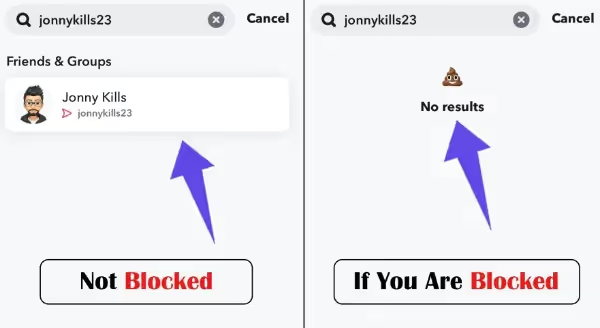
If you are blocked, you will:
- Lose access to their profile entirely
- Be unable to find them in search
- Lose chat history and Snap access instantly
Snapchat hides block notifications intentionally to protect privacy, which is why the app never confirms it directly.
Top 10 Signs That You Are Blocked on Snapchat
Snapchat does not send alerts when someone blocks you, which makes the situation confusing. However, the app leaves behind very specific and verifiable signs. When multiple signs appear together, you can be confident about how to tell if someone blocked you on Snapchat rather than guessing.
1. Check Recent Chat History
Open your Snapchat chat list and scroll carefully. If a conversation that previously existed has completely disappeared, this is a strong sign of blocking. When someone blocks you, Snapchat removes the entire chat thread—not just recent messages.
To verify:
- Search the chat name manually
- Restart the app and check again
If chats are gone and the user is no longer searchable, this strongly indicates a block. If chats are gone but the username still appears in search, the account may be deleted instead.
2. Search for Their Username
This is one of the most reliable confirmation methods.
Steps to check:
- Open Snapchat
- Tap the search icon
- Type the exact username (not the display name)
If:
- The username does not appear at all
- No profile shows under “Add Friends”
- Searching variations gives zero results
Then you are likely blocked. Display names can change, but usernames cannot—so if the exact username doesn’t show up, it’s a clear signal.
For extra confirmation, ask a mutual friend to search the same username. If they can see it and you can’t, you are definitively blocked.
3. Look in Your Friends List
This is one of the most direct and verifiable checks to confirm how to tell if someone blocked you on Snapchat.
Steps to check:
- Open Snapchat
- Tap your profile icon
- Go to “My Friends”
- Use the search bar to type the exact username
What It Means If They’re Missing
- If the username does not appear at all, it means you are no longer connected
- This usually indicates either blocking or removal
How to Tell If They Just Unfriended You
To confirm which one it is:
- Search for the username in the global Snapchat search
- If the profile appears and lets you send a friend request → you were unfriended
- If the profile does not appear anywhere → you are blocked
Blocked users are completely invisible across Snapchat, not just removed from Friends.
4. Try Sending a Snap or Message
Message behavior on Snapchat provides clear technical signals, not guesswork.
What “Pending” or Failed Status Indicates
- If a message shows “Pending” with a gray arrow, it usually means:
- You were removed as a friend
- If you cannot send a snap at all, or the message never goes through:
- This strongly indicates blocking
Blocked vs Removed vs Privacy Settings
- Blocked: Messages fail, snaps won’t send, no delivery status
- Removed: Messages show pending
- Privacy settings: May restrict stories, but messages still send
If message delivery is completely disabled, blocking is the likely cause.
5. Check Their Snap Score or Bitmoji Visibility
Snap Score and Bitmoji visibility offer one of the strongest confirmations.
Snap Score Disappears When Blocked
If you previously saw their Snap Score and it suddenly:
- Disappears completely
- Cannot be viewed anywhere
This usually means you’ve been blocked or removed.
Bitmoji and Profile Elements That Vanish
When blocked, you will lose access to:
- Bitmoji avatar
- Profile photo
- Snap Map presence
- Snap Score
How Privacy Settings Differ
Privacy settings can hide stories—but they do not remove Snap Scores or Bitmojis.
If all profile elements vanish at once, blocking is the most accurate explanation.
6. Look in Your Friends List
This is one of the most direct and verifiable checks to confirm how to tell if someone blocked you on Snapchat.
Steps to check:
- Open Snapchat
- Tap your profile icon
- Go to “My Friends”
- Use the search bar to type the exact username
What It Means If They’re Missing
- If the username does not appear at all, it means you are no longer connected
- This usually indicates either blocking or removal
How to Tell If They Just Unfriended You
To confirm which one it is:
- Search for the username in the global Snapchat search
- If the profile appears and lets you send a friend request → you were unfriended
- If the profile does not appear anywhere → you are blocked
Blocked users are completely invisible across Snapchat, not just removed from Friends.
7. Try Sending a Snap or Message
Message behavior on Snapchat provides clear technical signals, not guesswork.
What “Pending” or Failed Status Indicates
- If a message shows “Pending” with a gray arrow, it usually means:
- You were removed as a friend
- If you cannot send a snap at all, or the message never goes through:
- This strongly indicates blocking
Blocked vs Removed vs Privacy Settings
- Blocked: Messages fail, snaps won’t send, no delivery status
- Removed: Messages show pending
- Privacy settings: May restrict stories, but messages still send
If message delivery is completely disabled, blocking is the likely cause.
8. Ask a Friend to Search for Them
This method offers near-certain confirmation when you’re unsure how to tell if someone blocked you on Snapchat.
How to Check
Ask a trusted friend or mutual contact to search for the person’s username on Snapchat.
What the Result Means
- If your friend can see the profile but you cannot, you are blocked
- If neither of you can find the profile, the account may be deleted or deactivated
Snapchat blocking is account-specific, so visibility to others but not you is one of the clearest signs of being blocked.
9. Try Searching From a Different or New Account
Using another account removes all doubt and provides technical confirmation.
Steps to Verify
- Log in from a different Snapchat account or create a new one
- Search the person’s exact username
What It Confirms
- Profile visible on the new account but not your main account → blocked
- Profile missing everywhere → likely deleted or deactivated
This method works because Snapchat blocks users individually, not globally.
10. Check Story and Snap Map Visibility
Snapchat Stories and Snap Map activity change immediately after blocking.
Story Visibility
If you could previously view their stories and suddenly:
- Stories disappear entirely
- You cannot see them even during active posting periods
This often indicates blocking.
Snap Map and Location Sharing
- Blocked users lose access to Snap Map location entirely
- Inactive accounts may still show last known locations
If all map data disappears instantly, blocking is the likely cause.
How to Confirm the Difference Between Deletion and Blocking
Understanding the distinction avoids false conclusions.
Key Differences
- Blocked: Profile invisible only to you
- Deleted: Profile invisible to everyone
- Deactivated: Temporarily hidden, often reappears later
Step-by-Step Checklist
- Can others see the profile?
- Can a new account find it?
- Are chats, stories, and Snap Score gone?
If yes to all, you’ve been blocked.
When You Are Blocked: What to Do Next
Being blocked on Snapchat can be frustrating and confusing, but it’s important to approach the situation with maturity and respect. Understanding the next steps after finding out how to tell if someone blocked you on Snapchat can help you handle the situation gracefully and avoid unnecessary conflict.
Respect Privacy and Boundaries
First and foremost, it’s important to respect the other person’s decision. Snapchat’s blocking feature exists for a reason—whether it’s to establish privacy or avoid unwanted interactions. If someone has chosen to block you, their decision should be acknowledged, and boundaries should be respected. Avoid trying to reach out through other means like texting, social media, or using mutual friends to circumvent the block.
Alternative Ways to Communicate
If you need to communicate with the person for legitimate reasons, consider snapchat alternative channels such as email or a phone call, if appropriate. If they’re open to communication, they may choose to reach out to you through another platform. Respect their preference and allow them to make the first move if they want to reconnect.
Digital Etiquette After Finding Out
Handling digital relationships requires good etiquette. After discovering you’ve been blocked, don’t engage in public displays of frustration or try to confront the person directly. It’s essential to maintain digital maturity and respect the other person’s space. Everyone has the right to control their online presence and interactions, and it’s important to accept this decision without conflict.
Why Snapchat Doesn’t Show Blocked Notifications
Snapchat intentionally avoids notifying users when they’re blocked to reduce conflict and protect privacy.
App Design Choices Explained
By keeping blocking silent, Snapchat prevents confrontations, arguments, and retaliation. This design choice encourages users to manage their social connections discreetly.
Privacy and Conflict Minimization
Notifying users about blocks could lead to harassment or misuse. By hiding block notifications, Snapchat promotes a safer and more respectful social environment for everyone including kids above 13 years of age.
Understanding this design philosophy helps users respond thoughtfully instead of emotionally.
Common Misconceptions About Snapchat Blocking
When trying to figure out how to tell if someone blocked you on Snapchat, many users jump to conclusions based on incomplete signals. Snapchat’s design can make normal account changes look like blocking, which is why understanding common misconceptions is important before assuming the worst.
Not Seeing a Username Doesn’t Always Mean You’re Blocked
One of the biggest misconceptions is assuming that a missing username automatically means blocking. In reality, Snapchat search results can change due to several factors. The person may have changed their display name, temporarily deactivated their account, or adjusted who can find them using search. Network issues or app glitches can also prevent profiles from appearing momentarily. Blocking becomes likely only when the username is completely unsearchable, chats disappear, and other users can still see the profile.
Privacy Settings vs Blocking vs Deletion
Snapchat privacy settings allow users to limit who can view their stories or contact them, but these settings do not remove profiles, Snap Scores, or Bitmojis. Blocking removes all visibility only for you, while account deletion or deactivation removes the profile for everyone. Checking visibility across multiple accounts helps clarify the difference.
Conclusion
Figuring out how to tell if someone blocked you on Snapchat can feel confusing, but once you understand the clear signs, the process becomes much simpler. From missing chat history and invisible profiles to Snap Score changes and search limitations, Snapchat provides enough clues when viewed together. The key is checking multiple signals instead of relying on just one.
While social platforms change how we connect, the need for clear communication and trust remains constant—especially online. If you’re building a digital presence or running an online business, having the right tools matters just as much. Platforms like Alidrop help entrepreneurs create reliable, professional online stores with quality products, so you can focus on growing meaningful connections—both socially and commercially.
FAQs on How to Find Out if You're Blocked on Snapchat
How do you know if you are blocked on Snapchat?
You may be blocked if you can’t find the person’s username in search, your chat history disappears, snaps won’t send, and mutual friends can still see their profile. Multiple signs together confirm blocking.
When someone blocks you on Snapchat does their profile disappear?
Yes. When someone blocks you on Snapchat, their profile becomes completely invisible to you. You won’t see their username, Snap Score, Bitmoji, stories, or chat history anywhere in the app.
How do you tell if someone removed you on Snapchat?
If someone removed you, their name disappears from your Friends list, but you can still find their profile via search and send a new friend request. Chats may show “Pending” instead of failing.
What does it look like when you block someone on Snap?
When you block someone, they instantly lose access to your profile, chats, stories, Snap Map location, and Snap Score. You completely disappear from their Snapchat, without any notification.
What is soft blocking on Snapchat?
Soft blocking usually means removing someone as a friend and re-adding them later. It resets chats without fully blocking. Snapchat doesn’t officially label this, but users use it to clear connections quietly.
What is the difference between blocked and unadded on Snapchat?
Blocked means total invisibility—no profile, chats, or search access. Unadded means you’re no longer friends, but profiles remain searchable and messages show “Pending” instead of being blocked entirely.


%201.svg)