Dropshipping customer service eats your day if you let it. Order status questions, shipping inquiries, return requests, and product questions stack up fast when you're running a store on your own or with a small team. You answer the same questions over and over while orders keep coming in and suppliers need attention.
AI agents can take most of that off your plate. These systems handle routine customer interactions without you touching them, working around the clock while you focus on growth. You can automate responses to common questions, process order updates, and route complex issues to the right person when needed.
This guide walks through what AI customer service agents actually do, which tools work for dropshipping businesses, and how to build a system that handles the majority of your support load while keeping customers satisfied.
What Are AI Customer Service Agents?
AI customer service agents are software systems that interact with your customers through text or voice channels without human supervision. Unlike basic chatbots that follow pre-written scripts, these agents use large language models to understand context, make decisions, and take actions based on what customers need.
You can think of them as virtual team members who handle support tickets, answer questions from your knowledge base, look up order information in your systems, and complete tasks like booking refunds or updating shipping addresses. They connect to your backend systems through APIs, which means they can pull real customer data and make changes when needed.
How AI Agents Differ From Traditional Chatbots?
Traditional chatbots match keywords and follow decision trees. If a customer asks something outside the script, the bot breaks. AI agents understand context, remember previous conversations, detect emotion, and make decisions in real time.
When someone asks about their order, an AI agent can look up the order number, check shipping status, see previous interactions with that customer, and provide a personalized response that addresses the specific situation. A basic chatbot would just offer generic tracking information or transfer to a human agent.
The agent can also handle multi-step tasks. If a customer wants to cancel their membership and book onto a different class, the agent processes both requests in one conversation instead of requiring separate tickets or handoffs.
The Technical Foundation
These systems run on language models from providers like OpenAI, Anthropic, or Google. You configure them with instructions about your business, connect them to your tools through integrations, and they start handling conversations across email, live chat, messaging apps, or phone calls.
The agent needs access to three things to work properly. First, a knowledge base with information about your products, policies, and common questions. Second, integration with your order management system or CRM so it can look up customer data. Third, clear rules about when to escalate to a human agent and when to resolve issues independently.
10x Your Sales: Use Cases of AI Agents for Customer Service Support in Dropshipping

Here are different use cases of AI agents for customer service support in dropshipping:
Automated Order Status and Tracking Queries
Where is my order inquiries can be handled completely by AI agents. When a customer texts or emails asking about their package, the agent pulls up their order in your system, checks the current shipping status, and provides tracking information with expected delivery dates.
This works because order tracking is pure data retrieval. The agent doesn't need to make judgment calls or handle complaints. It just needs to fetch information from your fulfillment system and communicate it clearly. AI tools can handle 60 to 80 percent of customer service inquiries automatically, and order tracking makes up a large portion of that volume for dropshipping stores.
Returns and Refund Processing
AI agents can process standard return requests and refunds without human review. When a customer wants to return an item, the agent confirms the order details, checks your return policy to verify eligibility, generates a return label, and updates your system to expect the return.
The AI can process returns and cancellations without human touch. For straightforward cases that meet your return criteria, the agent completes the entire workflow. It only escalates when something falls outside normal parameters, like a return request past your window or an item marked as final sale.
Product Information and FAQ Responses
You can load your product specifications, sizing guides, material information, and frequently asked questions into a vector database. The agent searches this knowledge base contextually when customers ask questions, pulling the most relevant information to answer inquiries about product details, care instructions, or compatibility.
This eliminates the need for human agents to look up basic product information for every inquiry. The AI agent retrieves accurate answers from your documentation instantly and can handle multiple conversations simultaneously.
Booking and Scheduling Support
For businesses that combine product sales with service appointments or class bookings, AI agents can manage scheduling without human intervention. A customer can ask about available time slots, the agent checks your calendar system, shows options, and books the customer into their preferred slot when confirmed.
The system updates your backend in real time so there's no risk of double-bookings. The agent can also handle cancellations and rescheduling requests by modifying existing appointments in your system.
Escalation and Routing Intelligence
AI agents know when they're out of their depth. You configure escalation rules so the agent recognizes situations that require human attention, like complaints about product quality, complex technical issues, or requests for exceptions to your policies.
When escalation happens, human agents receiving escalations with full context attached resolve them 35 to 45 percent faster than agents starting from scratch. The AI passes along the complete conversation history, customer account details, and its analysis of the situation so your team member can jump straight into solving the problem.
10 Best AI Agents for E-commerce Businesses in 2026
Here are the best AI agents for e-commerce businesses. These are also the top 10 AI agents for dropshipping businesses in 2026:
1. Gorgias
Gorgias is a help desk AI platform built exclusively for e-commerce, with native integrations into Shopify, BigCommerce, and Magento that give agents direct access to order data, shipping details, and purchase history inside every conversation. Agents can process refunds, edit orders, and apply discount codes without leaving the platform.
The AI Agent handles common questions automatically and charges per resolution rather than per seat. Pricing starts around 50 dollars per month for basic plans with limited ticket volumes. For Shopify stores specifically, the deep integration makes it the strongest choice when you need your helpdesk connected to store data.
2. Tidio
Tidio is an AI-powered customer support service that provides a pop-up chat widget you can install on your dropshipping website. The Lyro AI assistant handles common customer inquiries autonomously and passes complicated questions to human support staff.
Lyro AI chatbot can handle up to 67 percent of client requests, offering 24-hour service. Pricing is usage-based with limits based on billable conversations. The platform works well for small to midsize dropshipping stores that want simple automation without coding knowledge. Paid plans start at 29 dollars per month to 749 dollars per month with a 7-day trial.
3. Zendesk AI
Zendesk is an enterprise-grade helpdesk with AI-powered chatbot capabilities built in. The platform's AI bot is pre-trained on billions of support conversations, so it handles common customer service scenarios with strong baseline accuracy.
Zendesk fits companies needing comprehensive customer service platforms across multiple channels and types of inquiries. It's not e-commerce specific but offers strong customization options. The system includes voice calls, email ticketing, chat, and self-service portals with AI-powered help centers.
4. Intercom
Intercom's Fin is 0.99 dollars per automated resolution, with suite seats starting from 29 dollars per month. The platform recently upgraded to Fin 2, which resolves up to 82 percent of support volume with human-quality, personalized, conversational answers.
Fin can handle complex questions like explaining what's included in a customer's pricing plan, updating order status, or changing bookings. Intercom works best for SaaS-style businesses and product-led growth teams that want to blend support with customer engagement.
5. Freshdesk
Freshdesk's Freddy AI brings intelligent ticket routing, sentiment analysis, and chatbot automation. Base plans start at 15 dollars per agent per month, with the Freddy AI Copilot add-on costing 29 dollars per agent per month.
The visual bot builder lets non-technical teams create conversation flows without coding. Freshchat integrates with Freshdesk for ticketing and includes basic analytics to track chatbot performance. Freshdesk is used by over 73,000 companies and appeals to teams needing solid customer service software without enterprise overhead.
6. Kustomer
Kustomer bridges the gap between conversational approaches and traditional ticketing with a customer-centric interface. The platform shows customer history, interactions, and data in a unified timeline rather than separate tickets.
AI automates routing, suggests responses, and predicts what customers need before they ask. Enterprise pricing is 89 dollars per user per month, and Ultimate is 139 dollars per user per month. Kustomer fits teams wanting complete customer context without traditional ticket constraints.
7. Ada
Ada autonomously resolves up to 83 percent of support issues without human intervention. The platform provides omnichannel support across web, mobile, social media, SMS, and voice in 50 languages.
Pricing starts at 30,000 dollars per year, with per-resolution pricing ranging from 1 dollar to 3.50 dollars per ticket. Ada targets enterprise brands with six-figure budgets for conversational AI and complex support requirements.
8. CustomGPT.ai
CustomGPT.ai builds custom chatbots trained on your business content without requiring coding skills. The platform creates AI agents that handle customer questions by accessing your product guides, FAQs, policies, and helpdesk articles.
Customers receive instant answers about shipping times, product specifications, and order status around the clock for dropshipping operations. This works well for stores that have comprehensive documentation but need to make it accessible through conversational AI.
9. OpenClaw
OpenClaw is a personal AI assistant you run on your own devices that answers you on the channels you already use. Supported channels include WhatsApp, Telegram, Slack, Discord, Google Chat, Signal, iMessage, IRC, Microsoft Teams, Matrix, LINE, and more.
OpenClaw includes built-in LLM API with 60 dollars in API credit and five flagship models available. As of March 2026, OpenClaw has over 68,000 GitHub stars and handles direct messages, group chats, media, locations, and messages across platforms. The open-source nature means you can self-host for complete data control and privacy.
10. Yuma AI
Yuma AI prioritizes retail workflows out of the box with outcome-aligned pricing that rewards real automation. These tools issue refunds, edit orders, and resolve intents inside the helpdesk you already use.
The platform plugs into Zendesk, Gorgias, and Kustomer without requiring re-platforming. Yuma focuses specifically on e-commerce operations rather than general customer service, which means the AI understands retail-specific contexts and actions from day one.
How to Use AI Agents to Run 80% of Your Dropshipping Customer Service?
Here is how you can use AI agents to run 80% of your dropshipping customer service. No BS, we get straight to the point below.
Understand the 80% Automation Reality
Production data across thousands of implementations consistently lands at 55 to 70 percent automation. Vendors showcase 90 percent automation in demos, but that's not what happens in real businesses.
You can reach 80% automation, but you need to be realistic about what that means. The 80 percent refers to routine inquiries that follow predictable patterns. Order tracking, basic product questions, return processing for standard cases, and policy clarifications all fit this category.
The remaining 20 percent includes complaints about product quality, requests for policy exceptions, complex technical problems, and situations where customers are frustrated and need human empathy. AI cannot replace human customer service agents for these cases, and businesses treating it like a replacement are the ones failing.
Identifying Your Automation Opportunities
A survey of 3,161 store owners found that 64% cited shipping delays as their biggest pain point, 52% reported low margins as a major hurdle, and 48 percent struggled with supplier reliability. Your AI agent needs to address these realities in how it communicates with customers.
Start by reviewing your last 100 customer service tickets. Categorize them into groups. You'll likely see patterns like order status inquiries, shipping time questions, product specification requests, return initiation, and account access issues. These categories show you where automation delivers the most value.
Calculate how much time your team spends on each category. If 40 percent of tickets are order tracking and each takes three minutes to resolve manually, you know exactly where to focus your AI agent first. Prioritize the high-volume, low-complexity categories.
Selecting the Right Tool for Your Budget
If you're starting with zero or an extremely low budget, Gorgias pricing starts around 60 dollars per month and Tidio paid plans start at $29 per month. Both offer free trials so you can test before committing money.
For bootstrapped dropshippers, the calculation is straightforward. Cost per customer interaction dropped 68 percent after AI implementation, from $4.60 to $1.45 dollars. If you're handling 200 support tickets per month at an average of 10 minutes each, that's 33 hours of work. Even at minimum wage, that's several hundred dollars in labor cost monthly. A $29 to $60 AI agent subscription pays for itself immediately.
For businesses dealing with rising order volumes and losing revenue to slow support responses, the investment threshold increases. Budget 2,000 dollars to 50,000 dollars per month depending on team size and conversation volume for enterprise-grade solutions. Companies see an average return of 3.50 dollars for every dollar invested in AI customer service.
Setting Up Your Knowledge Base Correctly
Your AI agent is only as good as the information you give it access to. You need to create comprehensive documentation about your products, shipping policies, return procedures, and common customer questions.
Start with your top 20 to 30 frequently asked questions. Write clear, complete answers that someone could understand without prior context. Include specific details like shipping timeframes for different regions, your exact return window, and how to handle common issues like missing packages or damaged items.
Store this information in a format your AI agent can access. Most platforms support uploading documents to a vector database, which lets the agent search your knowledge base contextually instead of relying on exact keyword matches. When a customer asks about shipping times, the agent can find relevant information even if they phrase the question differently than your documentation.
Connecting to Your Backend Systems
The agent needs integration with your order management system to look up customer data and order status. For Shopify stores, tools like Gorgias and Tidio offer native integrations that connect automatically.
If you're using a custom solution or a platform without pre-built integrations, you'll need to work with APIs. This is where tools like n8n become valuable. The platform lets you build workflows that connect your AI agent to your database, CRM, or fulfillment system without writing code from scratch.
You need to decide what actions the agent can take automatically versus what requires human approval. Can the agent process refunds up to a certain dollar amount on its own? Can it cancel orders? Can it update shipping addresses? Define these permissions clearly in your agent's configuration.
Training the Agent's Personality and Tone
You configure how the agent communicates through its system prompt. This is a set of instructions that tells the agent how to behave, what tone to use, and what personality to project.
For dropshipping businesses, you want the tone to be helpful, direct, and empathetic without being overly formal. The agent should acknowledge when customers are frustrated about shipping delays or quality issues, even if it can't immediately solve the problem.
You can instruct the agent to mirror your brand voice. If your store targets a younger demographic and uses casual language, tell the agent to communicate that way. If you sell professional equipment and maintain a formal tone, configure the agent accordingly.
Implementing Escalation Rules
Gartner projects that AI agents will reduce customer service operating costs by 30 percent across industries by the end of 2026, but only when properly configured with intelligent escalation.
Your agent needs clear rules about when to transfer conversations to human agents. Set triggers based on customer sentiment, keyword detection, and conversation complexity. If a customer uses words like "lawsuit," "attorney," or "fraud," escalate immediately. If the conversation goes back and forth more than five times without resolution, escalate.
When the agent escalates, it should pass complete context to your human team. The customer's order history, previous support interactions, the full conversation with the AI agent, and the reason for escalation all go to your team member so they can resolve the issue quickly.
Handling Multi-Channel Support
Your customers reach out through email, live chat on your website, social media messages, and sometimes text messages or phone calls. Your AI agent needs to handle all these channels consistently.
Most modern AI customer support platforms support omnichannel deployment. You configure the agent once, and it operates across all your channels with the same knowledge base and capabilities. When a customer starts a conversation on Instagram and follows up via email, the agent remembers the previous interaction and maintains context.
For channels like phone support, you can implement AI voice agents that handle incoming calls. These systems use speech-to-text to understand what customers are saying, process the request through your AI agent, and respond with natural-sounding speech.
Testing Before Full Deployment
Run your AI agent in parallel with your human team for at least two weeks before relying on it completely. During this period, the agent handles conversations but a human reviews every interaction before it gets sent to customers.
This testing phase reveals gaps in your knowledge base, situations where the agent makes mistakes, and edge cases you didn't anticipate. You'll see patterns in what the agent handles well versus where it struggles.
Use this data to refine your system prompts, expand your knowledge base, and adjust escalation rules. After two weeks of testing and refinement, you can enable autonomous operation for straightforward inquiries while keeping human review for complex cases.
Monitoring and Continuous Improvement
Year 1 ROI averages 41%, Year 2 hits 87%, Year 3 exceeds 124%. AI systems get better over time as they learn from more interactions.
You need to review your agent's performance weekly during the first month, then monthly after that. Look at resolution rates, escalation frequency, customer satisfaction scores for AI-handled conversations, and any patterns in what the agent gets wrong.
Most platforms provide analytics dashboards that show you these metrics automatically. Customer satisfaction scores are 12 to 18 percent higher when AI agents handle initial triage versus traditional IVR or rule-based bots, but only if you maintain the system properly.
Update your knowledge base when you notice the agent repeatedly struggling with certain questions. If customers frequently ask about a specific product feature that's not in your documentation, add it. If your return policy changes, update the agent's information immediately.
Skills and Resources You Need
For non-technical business owners, you don't need to know how to code to implement AI customer service agents. Platforms like Tidio, Gorgias, and Freshdesk provide visual interfaces where you configure the agent through forms and dropdown menus.
You do need to understand your customer service processes clearly enough to explain them to the system. If you can write a training manual for a human customer service representative, you can configure an AI agent.
How to Build an AI Customer Support Agent for Dropshipping in 2026?
If you’d like to go the custom route and buld your own AI customer service agent, we’ve got you covered there too!
Here is a short guide on how to build an AI customer support agent for your dropshipping business. You can use this AI dropshipping customer service support agent for handling 24/7 of customer requests, queries, and anything else:
1. Starting with n8n for Workflow Automation
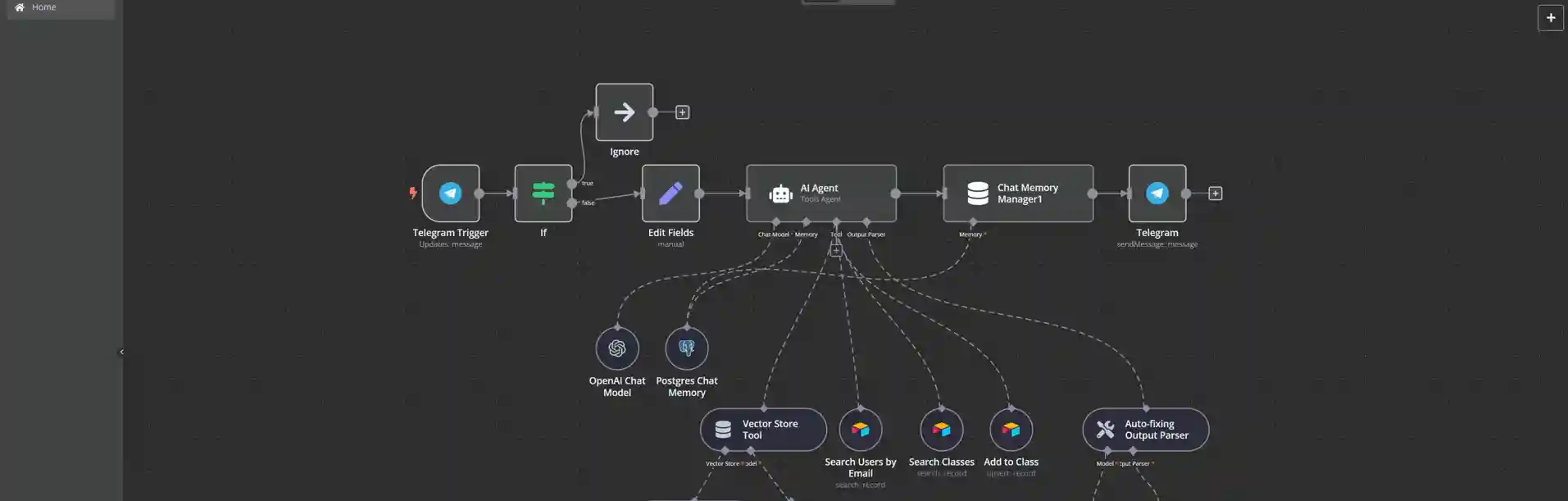
n8n is an open-source workflow automation platform that lets you build custom AI agents without extensive coding. You can connect the agent to your database, messaging platforms, and AI models to create a system tailored to your specific needs.
The platform uses a visual interface where you drag and drop nodes to build workflows. Each node represents an action, like receiving a message, searching a database, calling an AI model, or sending a response. You connect these nodes to create the complete flow of how your agent handles customer conversations.
For dropshipping businesses, this means you can build an agent that checks order status in your Shopify store, searches your product FAQ in a Pinecone vector database, and responds through Telegram, WhatsApp, or a chat widget on your website.
2. Setting Up Your Communication Channel
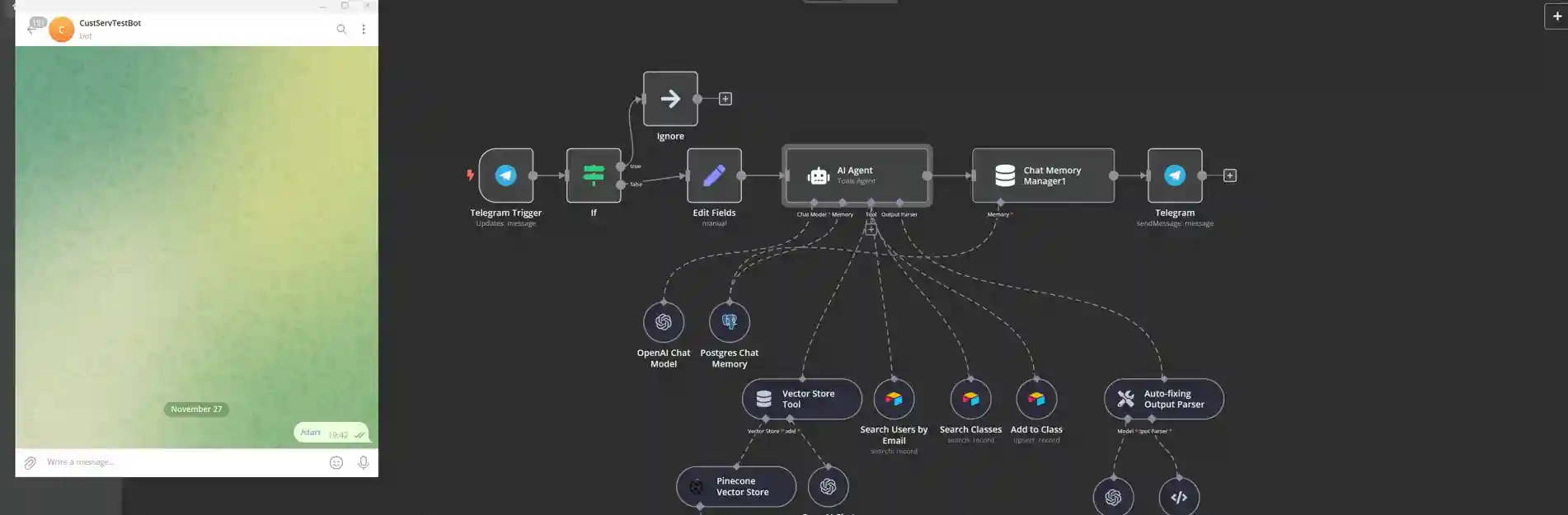
You need to choose how customers will interact with your agent. Telegram works well for testing because it's easy to set up a bot and doesn't require website integration. For production use, you'll want to implement the agent on the channels your customers actually use.
In n8n, you start with a trigger node that listens for incoming messages. For Telegram, you select the Telegram trigger and connect it to your bot. For website chat, you use a webhook trigger that receives messages from your chat widget. For text messages, you connect to Twilio or a similar SMS service.
The trigger captures the customer's message and passes it into your workflow for processing. You'll need to add basic filtering to ignore system messages or handle initial setup commands that platforms like Telegram require.
3. Connecting to Your Data Sources
Your agent needs access to information about your customers and orders. If you're using Airtable, you can create tables for members and orders, then connect n8n to search these tables based on customer email or order number.
For production systems, you'll connect to your actual order management system through its API. Shopify, WooCommerce, and most e-commerce platforms provide API endpoints that let you query order data, customer information, and product details.
You configure search tools in n8n that the agent can use when it needs to look up information. One tool might search customers by email address. Another tool might search orders by order number or customer ID. A third tool might search your product catalog by product name or SKU.
4. Building Your Knowledge Base
Create a document with your frequently asked questions, product information, shipping policies, and return procedures. This can be a Google Doc, a Markdown file, or structured text in any format.
Upload this document to a vector database like Pinecone. Vector databases let your agent search for information semantically rather than requiring exact keyword matches. When a customer asks "how long until my package arrives," the agent can find information about shipping timeframes even if your documentation uses the phrase "delivery times" instead.
In n8n, you add a vector store tool that connects to your Pinecone index. The agent can then search this tool when it needs to answer general questions about your business, products, or policies.
5. Configuring the AI Agent Node
The agent node is where you configure the actual AI model and its instructions. You'll use a model like GPT-4o from OpenAI, Claude from Anthropic, or Gemini from Google. These models understand natural language and can follow complex instructions.
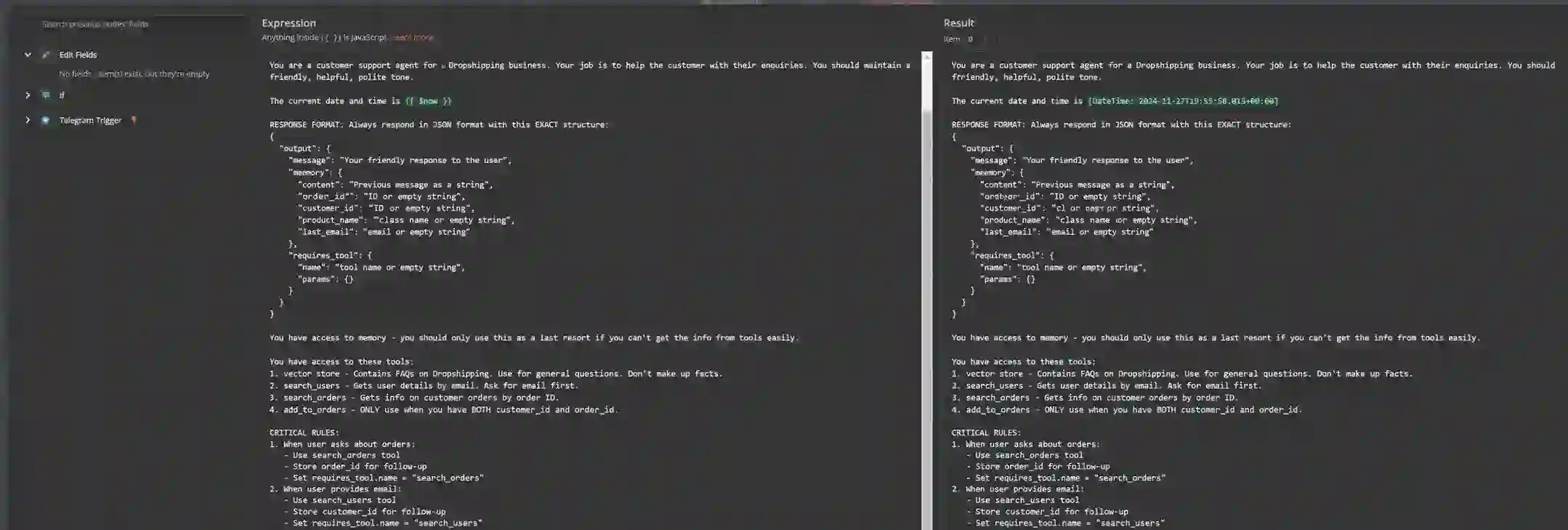
Your agent prompt is the most important part of the configuration. This is where you tell the agent who it is, what it can do, and how it should behave. The prompt should include the current date and time so the agent knows what "today" means when customers ask time-sensitive questions.
You list all the tools the agent has access to in the prompt. Tell the agent when to use each tool and what information it needs before calling them. For instance, the agent should search for users by email only after the customer has provided their email address.
6. Handling Memory and Context
Without memory, your agent forgets everything between conversations. If a customer messages in the morning and follows up in the afternoon, the agent won't remember the earlier conversation.
You can implement memory using a database like PostgreSQL with Supabase. This stores conversation history against the customer's identifier, like their phone number or email address. When they message again later, the agent retrieves previous conversations and maintains context.
In n8n, you configure a memory node that connects to your database. The agent automatically saves important information during conversations and retrieves it when needed.
7. Implementing Structured Output
You want the agent to output information in a consistent format so your workflow can process it reliably. This is especially important when the agent needs to perform actions like adding a customer to a class or processing a refund.
You configure the agent to output JSON with a specific structure. One field contains the message to send to the customer. Other fields contain data like the customer's record ID, the class they want to book, or whether the conversation needs human escalation.
You connect an output parser that checks whether the agent's response matches your expected format. If it doesn't, the parser runs the response through the AI model again to fix the structure. This ensures your workflow receives data in the format it expects.
8. Taking Actions on Backend Systems
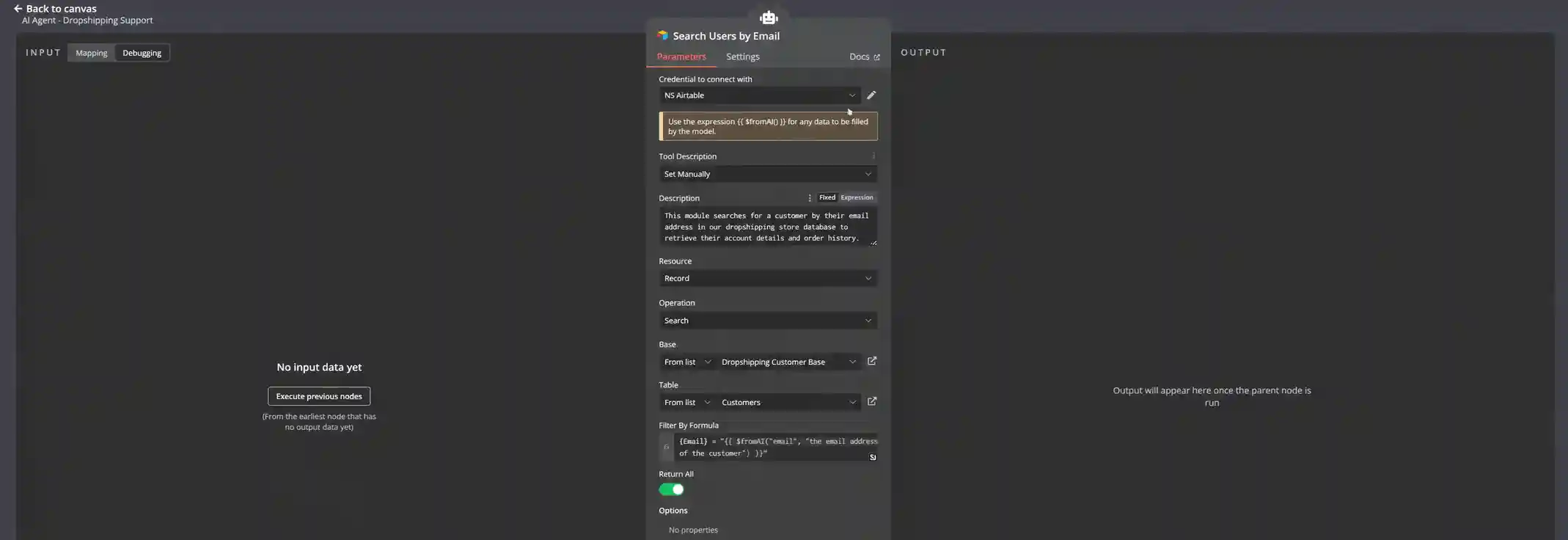
When the agent determines that a customer wants to book a class, cancel an order, or process a return, it needs to update your backend systems. In n8n, you configure action tools that make these changes.
For Airtable, you use the Airtable node to update records, create new entries, or delete data. For Shopify, you use the Shopify node or HTTP requests to the Shopify API. The agent provides the necessary data, like customer ID and product ID, and your workflow executes the action.
You need to be careful about permissions here. Define clear rules about what the agent can and can't do automatically. Processing returns under $50 might be automatic, but refunds over $100 require human approval.
9. Sending Responses Back to Customers
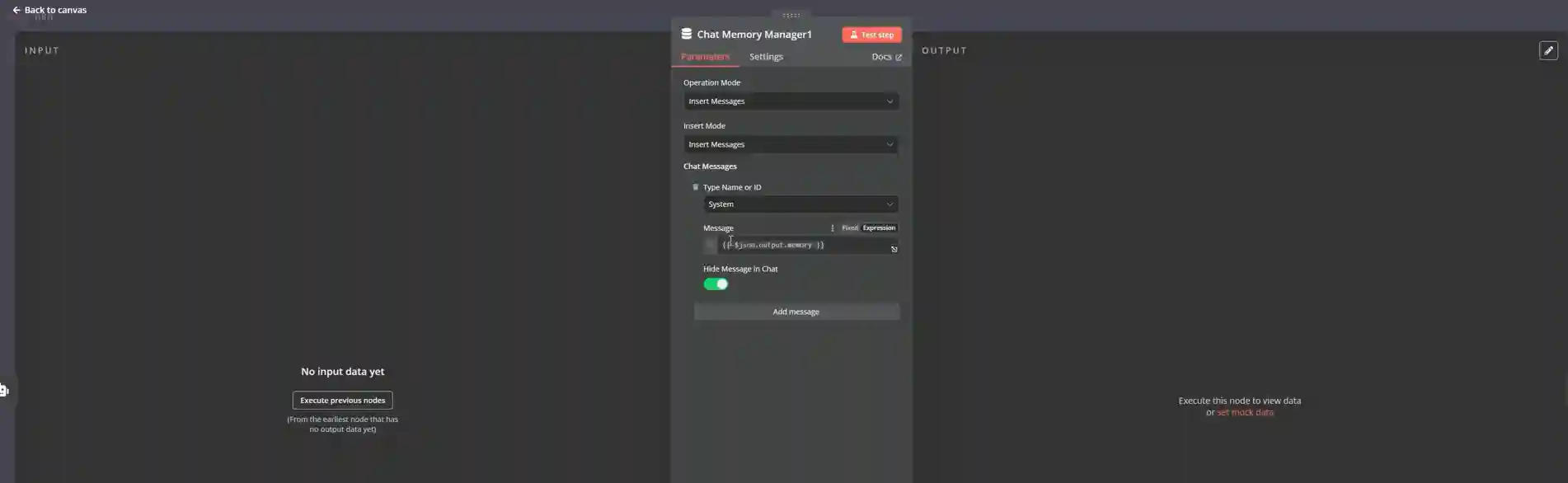
After the agent processes the customer's request, it needs to send a response. Your workflow takes the message output from the agent and sends it back through the same channel the customer used to contact you.
For Telegram, you use the Telegram send message node. For website chat, you send the response back through your webhook. For email, you use an email sending node. The response goes to the same conversation thread so customers see it as a continuation of their interaction.
10. Testing with Real Scenarios
Before deploying your agent to handle live customer conversations, test it with realistic scenarios. Send messages asking about order status, request returns, ask product questions, and try edge cases where customers phrase things unusually or ask about situations not covered in your knowledge base.
Watch how the agent responds and check whether it's retrieving the right information, making correct decisions about when to escalate, and communicating clearly. You'll find gaps in your knowledge base, situations where the agent gets confused, and places where your prompts need more specific instructions.
Refine your configuration based on these tests. Add missing information to your FAQ document, adjust your prompts to handle edge cases better, and update your escalation rules to catch situations you didn't anticipate.
11. Deploying and Monitoring
Once your testing shows the agent handling conversations reliably, you can deploy it to production. Start with limited hours or specific channels to make sure everything works as expected with real customer traffic.
Monitor conversations closely during the first week. Review every interaction the agent has and look for patterns in what works well versus what needs improvement. Most issues show up in the first few days of live operation, when real customers ask questions you didn't think of during testing.
Use the insights from monitoring to continuously improve your agent. Update your knowledge base, refine your prompts, and adjust your tools as you learn more about how customers actually use the system.
12. Sourcing Products for Your Dropshipping Store
When you're setting up your dropshipping business, finding reliable suppliers is just as important as handling customer service well. Alidrop helps you source products from AliExpress dropshipping, Alibaba suppliers, and Temu suppliers all in one place.
You get access to the best US and EU suppliers worldwide, which means faster shipping times and better product quality than relying solely on overseas suppliers. The platform includes an AI Shopify store builder that helps you set up your store quickly and an AI product description writer for creating SEO-optimized listings.
Check out the Alidrop marketplace to find trending products and see what's working for other dropshippers. The platform integrates with major e-commerce platforms like eBay, Shopify, and Amazon, and provides 24/7 VIP customer service support. You can start with a 7-day free trial to test the platform before committing.
For businesses looking to automate even more of their operations beyond product sourcing, read about chatbots, email flows, and support automation to save hours weekly.
Conclusione
Gli agenti del servizio clienti AI gestiscono le richieste ripetitive che richiedono la maggior parte del tempo di assistenza. Lavorano 24 ore su 24, mantengono risposte coerenti e consentono al team di concentrarsi su questioni complesse che richiedono giudizio umano ed empatia.
La tecnologia funziona quando viene implementata correttamente. Inizia con una documentazione chiara, connetti correttamente i tuoi sistemi, imposta regole di escalation realistiche e monitora continuamente le prestazioni. Non raggiungerai il 100% di automazione, ma è possibile raggiungere l'80% per le attività di supporto di routine in dropshipping.
L'investimento si ripaga da solo grazie alla riduzione dei costi di manodopera, ai tempi di risposta più rapidi e alla capacità di gestire volumi di ordini in crescita senza scalare proporzionalmente il team di supporto. Scegliete strumenti adatti al vostro budget e alle vostre capacità tecniche, testateli accuratamente prima della distribuzione completa e perfezionateli in base alle interazioni reali con i clienti. Prova Alidrop gratis oggi.
Domande frequenti sul servizio clienti su come utilizzare gli agenti AI per il dropshipping
Qual è la differenza tra agenti di intelligenza artificiale e chatbot?
Gli agenti di intelligenza artificiale comprendono il contesto e prendono decisioni utilizzando modelli linguistici di grandi dimensioni, mentre i chatbot tradizionali seguono script e alberi decisionali già scritti. Gli agenti possono accedere ai tuoi sistemi di backend per cercare ordini, elaborare rimborsi e completare attività in più fasi. I chatbot si interrompono quando i clienti fanno domande diverse dalle loro risposte programmate. Gli agenti di intelligenza artificiale gestiscono conversazioni imprevedibili ragionando in base alle esigenze dei clienti.
Quanto costa implementare il servizio clienti basato sull'intelligenza artificiale?
Le soluzioni entry-level partono da 29 a 60 dollari al mese per piattaforme come Tidio e Gorgias. Le implementazioni di medio livello con più funzionalità costano dai 200 ai 2.000 dollari al mese. Le soluzioni aziendali con integrazioni personalizzate e volumi di conversazione elevati vanno da 2.000 a 50.000 dollari al mese. Il rendimento medio è di 3,50 dollari per ogni dollaro investito. Il costo per interazione scende da circa 4,60 dollari con agenti umani a 1,45 dollari con l'IA.
Gli agenti AI possono gestire automaticamente i rimborsi e le cancellazioni degli ordini?
Sì, puoi configurare gli agenti AI per elaborare rimborsi e cancellazioni fino a limiti specificati senza l'approvazione umana. La maggior parte delle aziende stabilisce delle soglie, ad esempio autorizzare rimborsi automatici inferiori a 50-100 dollari e richiedere una revisione umana per importi maggiori. L'agente controlla le tue politiche, verifica che la richiesta soddisfi i criteri, elabora l'azione tramite il tuo sistema di gestione degli ordini e conferma il completamento con il cliente. I casi complessi o le eccezioni politiche continuano a essere trasmessi agli esseri umani.
Quale percentuale del servizio clienti può effettivamente automatizzare l'IA?
I dati di produzione mostrano un'automazione dal 55 al 70 percento in migliaia di implementazioni, con sistemi ben configurati che arrivano fino all'80 percento. Il monitoraggio degli ordini, le domande di base sui prodotti, l'avvio dei resi e le informazioni sulle politiche costituiscono la maggior parte delle interazioni automatizzate. I reclami complessi, le eccezioni alle politiche, i problemi di qualità e i clienti frustrati che richiedono empatia richiedono una gestione umana. La percentuale di automazione dipende dalla complessità del prodotto, dalle policy e dalla completezza della configurazione del sistema.
Ho bisogno di competenze tecniche per configurare un agente del servizio clienti AI?
Non sono richieste competenze di programmazione per piattaforme come Tidio, Gorgias, Freshdesk o Zendesk. Questi strumenti forniscono interfacce visive in cui è possibile configurare gli agenti tramite moduli e menu. È necessario documentare in modo chiaro i processi di assistenza clienti e comprendere le politiche in modo sufficientemente approfondito da spiegarle. Le implementazioni personalizzate più avanzate che utilizzano strumenti come n8n richiedono conoscenze di base sulle API e sull'automazione del flusso di lavoro, ma molte aziende hanno successo prima di tutto con piattaforme già pronte.
Quanto tempo è necessario per implementare un agente del servizio clienti AI?
Le implementazioni semplici che utilizzano piattaforme come Tidio o Gorgias richiedono giorni per configurare le funzionalità di base. Sono necessarie da due a quattro settimane di test e perfezionamento prima di affidare all'agente la gestione autonoma delle conversazioni. Le implementazioni aziendali complesse con una profonda integrazione CRM richiedono in genere da quattro a 12 settimane, tra cui formazione, test e implementazione graduale. Le build personalizzate che utilizzano strumenti di automazione del flusso di lavoro possono durare da due a tre mesi a seconda dei requisiti. Inizia con funzionalità di base ed espandi nel tempo.


%201.svg)