

You started your dropshipping store to build a business, not to sit around copying and pasting customer addresses into AliExpress. We have tested tons of dropshipping tools so we know a thing or two about how to get things running without the daily grind. Trust us, manual order processing is a trap. If you are processing orders one by one, that is exactly what you are doing. Each order takes several minutes. When you get to ten orders a day, you are losing over an hour. At fifty orders, you have a full-time job just doing manual data entry. Miss one piece and everything falls apart like waves hitting a sand castle fast. Your customers will get annoyed or impressed, depending on the tools you use.
This is where automation changes everything. Instead of logging into AliExpress for every sale, you use tools that place orders for you in the background. This guide walks you through how to automate AliExpress orders using Alidrop, a platform built to handle the heavy lifting. You will learn the exact steps to set up automation so your store runs itself while you focus on marketing and growth.
What is AliExpress Order Automation?
AliExpress order automation means your dropshipping tool communicates with AliExpress without you sitting at the keyboard. When a customer buys from your store, the tool sends the order details to the supplier, processes payment, and updates your customer with tracking information. You do not touch anything.
Manual order processing creates bottlenecks. You might forget to update tracking or miss an order during busy periods. Automation removes these risks. The software handles the repetitive work consistently and accurately. For dropshippers moving past the hobby stage, automation is not optional. It is the only way to scale beyond what you can handle manually.
AliExpress order automation also prevents errors. When you manually type customer addresses, typos happen. Automated systems pass the information exactly as your customer entered it, reducing shipping mistakes and returns.
How Alidrop Automates Your Order Workflow
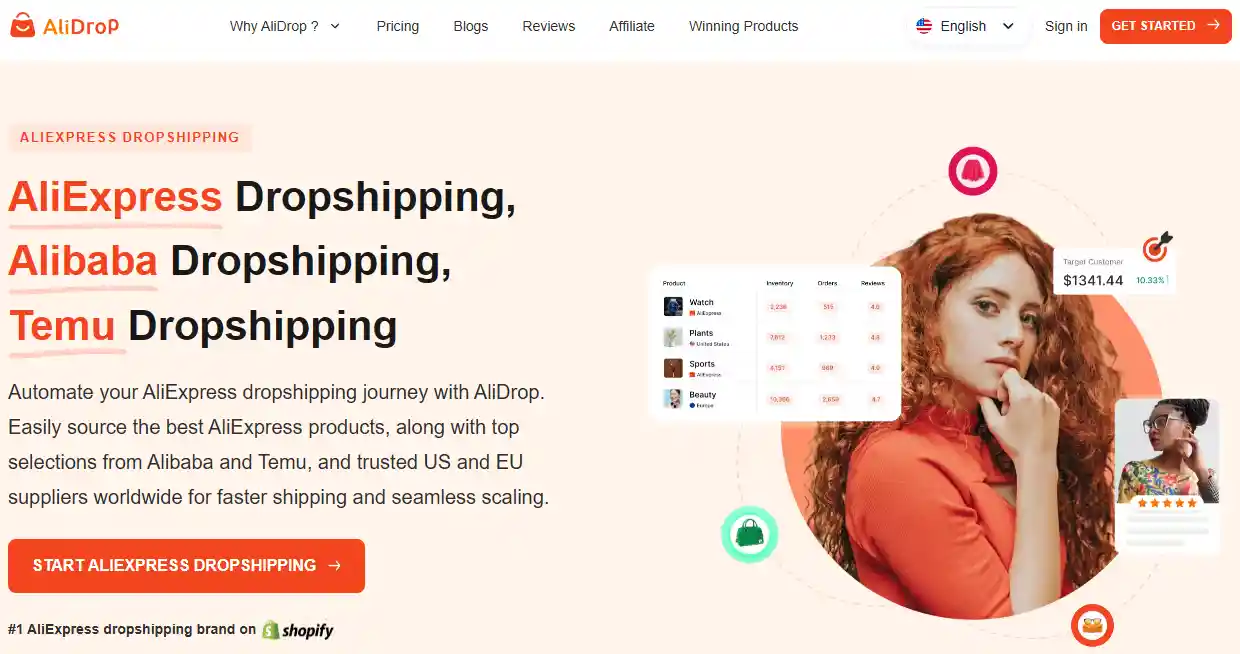
Alidrop connects your store to multiple supplier platforms including AliExpress, Alibaba, and Temu. Instead of jumping between tabs, you manage everything from one dashboard. The platform watches for new orders and processes them according to rules you set.
The Technical Flow Behind the Scenes
When you set up automation, several things happen in sequence. Your customer checks out on your Shopify or WooCommerce store. Alidrop detects the new order instantly. It checks your product mapping to know which supplier provides that item. The system then logs into your AliExpress account (or uses your stored payment method) and places the order with your customer's shipping address.
Once the supplier ships the item, Alidrop grabs the tracking number from AliExpress and pushes it back to your store. Your customer gets an automatic email with shipping details. You did nothing except make the initial sale.
Real-Time Inventory and Price Syncing
One major risk with manual dropshipping is selling products that go out of stock. You list an item, and three days later the supplier runs out. Now you have to cancel orders and refund customers. AliDrop prevents this through continuous synchronization. If a supplier updates their inventory on AliExpress, your store reflects that change immediately. If a price changes, your cost updates automatically. You can set rules to adjust your retail price or pause listings that become unprofitable.
Step-by-Step Guide to Automating Orders with Alidrop
Let us walk through the actual setup process. You can complete these steps in under an hour and start processing orders automatically.
Step 1: Create Your Alidrop Account and Connect Your Store
Go to Alidrop and sign up. You will link your ecommerce platform during onboarding. Alidrop integrates directly with Shopify and WooCommerce. The connection takes about two minutes. You authorize the app to access your products and orders. This is read and write access, meaning Alidrop can import products and update order statuses but cannot change your store settings without permission.
Step 2: Import Products from AliExpress
You can browse AliExpress through the Alidrop interface or use the Chrome extension while shopping. When you find a product you want to sell, click "Import to Store." The system pulls the product title, description, images, and variants.
You have options here. You can edit the title for SEO, rewrite the description in your brand voice, or use the AI product description writer to generate unique content. You also set your pricing rules. Many sellers use a multiplier formula. If the product costs $10 on AliExpress, you might set a rule to price it at $24.99 in your store. Alidrop remembers this rule for future imports.
Step 3: Set Up Variant Mapping
This step matters more than beginners realize. A t-shirt on AliExpress might come in small, medium, and large. Your store needs to know that "Small" in your system maps to "S" on the supplier side. Variant mapping ensures when a customer buys a small red shirt, Alidrop orders the correct item.
You can map variants manually during import or set up global rules. For example, you might map all size options automatically so future imports require less work.
Step 4: Configure Auto-Ordering Rules
Now you reach the core of automation. In your Alidrop settings, you enable auto-order fulfillment. You choose which payment method to use. Many sellers link a credit card specifically for supplier purchases. You also set order minimums. Maybe you want to review orders over $100 before processing. You can configure that rule.
The system also handles edge cases. If a supplier increases the price unexpectedly, you can pause that item until you approve the new cost. This prevents profit erosion from sudden supplier changes.
Step 5: Test the Workflow with a Sample Order
Before letting automation run live, place a test order yourself. Buy one of your products through your store checkout. Watch what happens. Alidrop should detect the order and process it according to your rules. You will see the order move through stages: "Awaiting Payment," "Order Placed," "Processing," and finally "Shipped" with a tracking number.
Testing catches configuration mistakes. Maybe your variant mapping was wrong, or your payment method failed. Fix these issues on a test order instead of a real customer order.
Why Use Alidrop to Automate AliExpress Orders?
Alidrop bundles several tools that work together to automate AliExpress orders and your entire operation.
One-Click Product Importing
You do not need to copy-paste anything. The import feature pulls complete product data including multiple images and variants. This saves hours when adding new products to your catalog. You can import single items or batch import dozens at once.
Multi-Supplier Support
Alidrop works with AliExpress, Alibaba, and Temu suppliers. It also connects you to best US and EU suppliers for faster shipping options. This flexibility means you are not locked into one sourcing channel. If you need faster delivery for a specific market, you can switch suppliers without changing platforms.
The Alidrop Marketplace
Beyond AliExpress, the platform includes its own marketplace of vetted suppliers. These products come with faster shipping and higher reliability because Alidrop has pre-screened the vendors. For sellers building a brand, this marketplace offers products that do not appear on every other dropshipping store.
Real-Time Tracking Updates
Customers ask "where is my order" constantly when tracking is delayed. Alidrop automates tracking updates. When the supplier provides a number, the system pushes it to your store and triggers customer emails. This reduces support tickets and keeps buyers informed.
Bulk Editing Tools
Managing hundreds of products means occasional updates. Maybe you need to raise prices across your catalog or change shipping settings. Alidrop's bulk editor lets you select multiple products and apply changes simultaneously. You can edit titles, descriptions, prices, and variants in batches.
What Happens After You Automate Orders?
Once automation runs, your daily work changes. Instead of processing orders, you check for exceptions. Maybe an order failed because the supplier was out of stock. Maybe a customer requested a cancellation. These edge cases still need human attention.
The rest of the time, you focus on higher-value activities. You research new products. You run ads. You improve your store design. This shift from operator to owner is what allows you to scale.
Automation also improves customer experience. Orders placed at 2 AM get processed immediately. Tracking numbers appear faster. Customers receive shipping notifications without delay. These small improvements build trust and reduce refund requests.
Common Mistakes When Setting Up AliExpress Automation
Even with good tools, mistakes happen. Here are problems to avoid.
Not Testing the Full Workflow
Some sellers enable automation and assume it works. They do not test until a customer complains about a missing order. Always run test purchases through your own store to verify every step.
Poor Variant Mapping
If your store sells a blue widget but the supplier only has blue widgets in stock, variant mapping matters. Mismatched variants cause orders to fail or customers to receive wrong items. Double-check your mappings, especially for products with multiple options.
Ignoring Price Fluctuations
AliExpress prices change frequently. A supplier might raise prices during peak season. If your automation does not account for this, you could sell products at a loss. Set price monitoring rules that pause orders when costs exceed your thresholds.
Using the Wrong Payment Method
Some credit cards flag multiple AliExpress transactions as fraud. Your automation stops working until you resolve the block. Consider using payment methods designed for high transaction volume. PayPal and certain business cards work better for automated ordering.
Benefits of Automating AliExpress Orders
When you remove manual work from your operation, several things improve.
- You reclaim hours each day. What used to take an hour now takes minutes. You can handle more orders without hiring help.
- Errors decrease. No typos in addresses. No forgotten tracking numbers. The system does exactly what you programmed it to do.
- You scale faster. Manual processes limit growth because you only have so many hours. Automation removes that ceiling. Your store can grow from ten orders to a hundred without you working more hours.
- Customers get better service. Faster processing means faster shipping. Automatic tracking updates mean fewer support questions. Happy customers leave better reviews and buy again.
Is AliExpress Order Automation Legal and Safe?
Automation is completely legitimate. AliExpress allows dropshipping, and tools like Alidrop operate within the platform's terms. The key is using automation responsibly. Do not place fraudulent orders. Do not use fake accounts. Follow the rules and you will have no problems.
Alidrop keeps your data secure. Your AliExpress login credentials stay encrypted. Payment information remains protected. The platform does not share your data with third parties.
For suppliers, automation looks like any other order. They see the customer name and shipping address. They do not see that you used a tool. Your business relationship with suppliers remains unchanged.
What to Watch Out For When You Automate AliExpress Orders
AliExpress order automation is powerful, but it has limits. You still need to choose good suppliers. The tool cannot fix a bad product or an unreliable vendor. Vet your suppliers carefully before adding them to your automated workflow.
Currency fluctuations can impact profits. If you sell in US dollars but buy in Chinese yuan, exchange rate changes matter. Monitor your margins and adjust pricing when needed.
Some products have shipping restrictions. Certain items cannot ship to specific countries. Your automation rules should account for these limitations. Configure your settings to block orders for restricted products.
Customer service still needs you. If a product arrives damaged, the customer will contact you. Automation handles fulfillment but not disputes. You remain responsible for refunds and replacements.
If you need specific supplier recommendations for certain niches, you can also find reliable Indian dropshipping suppliers here or check out these top grocery dropshipping suppliers for specialized sourcing.
Conclusion
Manual dropshipping works when you are small. But every successful store hits a point where manual processing becomes a bottleneck. That point usually comes around twenty orders per day. Beyond that, you either hire help or automate.
Automation through Alidrop lets you skip the hiring step. You keep full control while removing the repetitive work. Your business becomes more efficient and more profitable.
Start automating your AliExpress orders today. Let the app do the boring work while you build something bigger. Try Alidrop and scale your store.
Automate AliExpress Orders FAQs
Can I automate AliExpress orders if I use multiple suppliers for different products?
Yes. Alidrop supports multi-supplier automation. You can source from AliExpress for some products and from US or EU suppliers for others. The system routes each order to the correct supplier based on your product mapping. This gives you flexibility without complicating your daily workflow.
What happens if a supplier runs out of stock after I list the product?
Alidrop's real-time inventory sync prevents this. When the supplier updates their stock on AliExpress, your store updates automatically. If an item goes out of stock, it becomes unavailable for purchase. You avoid the headache of canceling orders and refunding customers.
Do I need to keep my AliExpress account logged in all the time for automation to work?
No. Alidrop stores your credentials securely and logs in when needed to place orders. You do not need to stay logged in. The system handles authentication behind the scenes. Just make sure your payment methods stay current and your account remains in good standing.
How does Alidrop handle shipping costs from different suppliers?
Alidrop pulls shipping costs from the supplier during checkout and adds them to your total. You can set rules to either pass these costs to customers or absorb them into your pricing. The system calculates final costs accurately so you never lose money on shipping discrepancies.
Can I review AliExpress orders before they get placed automatically?
Yes. You can set rules to hold orders above certain amounts or from specific suppliers for manual review. This gives you control over high-value transactions or new supplier relationships while still automating routine orders. The hold feature lets you approve or cancel before payment processes.
What happens if a customer wants to cancel an order after automation has already placed it?
You will need to handle cancellations manually. Contact the supplier through AliExpress to request cancellation. If the supplier agrees, process the refund through your store. Some suppliers charge restocking fees, so factor that into your cancellation policy.


%201.svg)